| Visualize Your Web Page in 3D |
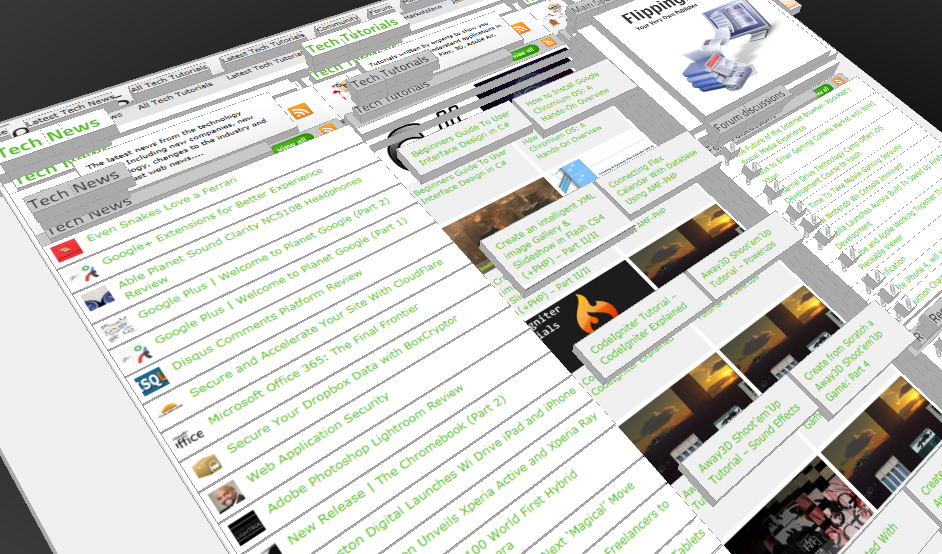
Ever wondered if you could visualize your website in 3D? Well, here’s one such Firefox extension that allows you to do so. Tilt is a Firefox add-on that lets you visualize any web page DOM and provides the relationship between various parts of a website in 3D.
|
| Away3D Shoot’em’Up Tutorial – Powerups |
In this article we add some powerups to the game.
|
| Away3D Shoot’em’Up Tutorial – Sound Effects |
In this article we add some sound effects to the game.
|
| Create from Scratch a Away3D Shoot’em’Up Game: Part 4 |
Now that we have the player and some enemies we need for them to be able to interact. This is done through collision detection which you will learn in this fourth part.
|
| Create from Scratch a Away3D Shoot’em’Up Game: Part 3 |
After you have created the 3D level, in the part 3 of this Away3D series, we will show you how to add the player spacecraft and enemies.
|
| Create from Scratch a Away3D Shoot’em’Up Game: Part 2 |
In the part 1 of these tutorial series articles we created a framework that we could build off to start making the actual game. Now it’s time to create a 3D level for the player to fly through.
|
| Create from Scratch a Away3D Shoot’em’Up Game: Part 1 |
Today we start a 9 part tutorial series on creating a Shoot’em’Up game. We will cover all the necessary topics to create it from scratch, which will help you to understand and apply these guidelines to other projects. Ath this first part. we look at getting the Away3D engine up and running by creating a UIComponent that will contain and initialize the necessary Away3D components.
|
| Create a 3D Bowling Game with JiglibFlash and Papervision 3D |
Possibly the hottest thing to hit the Flash community since the advent of several excellent 3D engines is the recent debut of 3D physics engines. Here we’ll examine a way of using one of the more popular 3D engines, JiglibFlash, in conjunction with the prominent 3D engine Papervision3D to create a bowling game.
|
| Create in Flex a 3D Image Gallery using Actionscript 3.0 and Alternativa3D |
The web is a great platform for storing and displaying photos. Gone are the days when your photos sat in a photo album only to be pulled out when you needed to bore relatives with your memories. These days it …
|
| Setup Alternativa3D Development Environment |
After our Alternativa 3D tutorials series, still some to know about how to setup Flex Builder correctly in order to start deploying their own Alternativa3D Flash Applications. Therefore we created this tutorial to guide and help you through the steps of setting up an Alternativa3D development environment.
After completion of this tutorial, be sure to have a look to the Alternativa 3D tutorials series, stepping you in some of the most important features of this powerful Flash 3D engine.
|
| Alternativa 3D Series – Tutorial 8 – Imposters |
In the last article we saw what a Sprite3D was, and the performance benefits they have over regular 3D meshes. In this article we will see how Sprite3D’s can be used to selectively replace 3D meshes, allowing a large number of objects to appear on the screen while still keeping frame rates up.
|
| Alternativa 3D Series – Tutorial 7 – Sprite3D |
A common concept amongst 3D engines is the billboard. A billboard is usually a rectangle that is always orientated to face the camera, presenting the viewer with a face that that is always “front on” regardless of the cameras orientation. More often than not appropriately textured billboards are used in great numbers to represent effects like smoke, rain, snow or fire. This is because billboards require very little processing power: a rectangle is just two triangles, and most modern systems measure triangle throughput in the millions per second. But sometimes you just want to show a 2D object in a 3D world – maybe an icon that hovers over an object or perhaps some text that would be awkward or unpractical to render as a 3D object.
|
| Alternativa 3D Series – Tutorial 6 – Dragging 3D Objects in Flex 3 using Alternativa3D and Actionscript 3 |
In the last Flex/Alternativa3D tutorial you saw how to respond to mouse events that involve Alternativa 3D objects. Once the view was set to be interactive handling mouse events was actually pretty straight forward: you simply attach an event listener to the Alternativa object, just as you would any normal GUI element like a button or checkbox. In this tutorial we will take this interactivity one step further and allow 3D objects to be dragged around on the screen.
|
| Create a 3D Sliding Puzzle Game in Flex with ActionScript 3.0 and Away3D |
Flash Platform is a great tool to create games, either for internet or mobile content. With the introduction of Flash 3D Engines, the ability and success of creating flash games is even bigger. In this tutorial we are going to build up a simple sliding puzzle. Puzzle images are dynamically loaded and sliced so you can easily use your own images if you like. Learn, try and leave a comment showing your results.
|
Become a TTL VIP Member & Get Notified of The Best Changes in Technology, Plus Win Prizes in Our VIP Only Contests...