SWFObject and Best Practice Implementation
by 29 June, 2009 12:00 pm33
With more and more full screen Flash web sites appearing on the internet, it’s important to understand how to properly embed the Flash movie in the browser window.
In this tutorial we will cover best practice embedding of SWF movies using SWFObject with a custom function for adding browser scrollbars for smaller browser windows.
Requirements
- Adobe Flash
- HTML Editor or Notepad
- SWFObject (latest version 2.1 at the time of writing)
- Download the latest version of SWFObject from Google Code (http://code.google.com/p/SWFObject/)

Pre-Requisites
Basic knowledge of Flash and HTML. This tutorial is intended for all skill levels.
Step 1 Setup your SWF for full screen viewing.
Create a new SWF movie, this can be any size you want, for this example I’ve setup a new movie at 600 pixels wide by 400 pixels high ( 600 x 400 px).
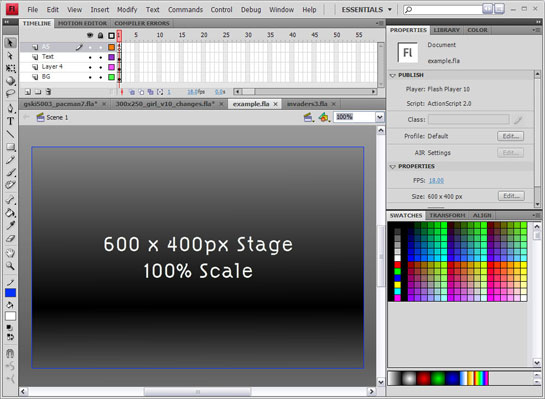
When you embed an SWF in your HTML, it’s default behavior is to scale to fill the width and height of the browser window. This means that if you create a SWF at 600x400pixels and view it on a browser sized at 1024×768 your beautifully designed 600x400px SWF will scale to 1024×768 and look .
For the purposes of this tutorial, we want our SWF to stay at scaled 100%, if our 600x400px design is viewed on a larger browser window such as 1024×768 px, we want the Flash stage to be centered and for the extra space around the stage to be filled with our overflow background.
To stop our SWF from scaling, we simply add this line to Frame 1 of our ActionScript:
ActionScript 2:
Stage.scaleMode = "noScale";
ActionScript 3:
stage.scaleMode = StageScaleMode.NO_SCALE;
Step 2 Setup your xHTML Template
This is a standard W3C Compliant xHTML Template that I recommend you use a basis for all of your sites.
<!DOCTYPE html PUBLIC "-//W3C//DTD XHTML 1.0 Strict//EN" "http://www.w3.org/TR/xhtml1/DTD/xhtml1-strict.dtd">
<html xmlns="http://www.w3.org/1999/xhtml" lang="en" xml:lang="en">
	<head>
		<title>Title</title>
	</head>
	<body>
	</body>
</html>
Save this file as test.html
Step 3 Add SWFObject Dynamic SWF embedding
Extract the SWFObject zip file you downloaded earlier and copy the SWFObject.js and expressInstall.swf files into the same directory as your new index.html file.
Step 3a
Add the SWFObject.js include to the head tag of our HTML template.
<script type="text/javascript" src="SWFObject.js"></script>
<script type="text/javascript">
//<![CDATA[
SWFObject.embedSWF("example.swf", "flashMovie", "100%", "100%", "6.0.0","expressInstall.swf");
//]]>
</script>
Step 3b
Add the flashMovie div and flashContainer div to the body tag of our HTML Template.
<div id="flashContainer">
	<div id="flashMovie">
		<h1>Alternative flashMovie</h1>
		<p><a href="http://www.adobe.com/go/getflashplayer"><img src="http://www.adobe.com/images/shared/download_buttons/get_flash_player.gif" alt="Get Adobe Flash player" /></a></p>
	</div>
</div>
Step 3c
Add the following CSS to style the div flashContainer and flashMovie in the head tag. This resets the browser margins and padding to 0px, ensuring the SWF fille the entire browser window and sets the flashContainer div to fill to 100% of the browsers width and height.
	<style type="text/css" media="screen">
		html, body{
			margin:0;
			padding:0;
			height:100%;
		}
		#flashContainer{
			width:100%;
			height:100%;
		}
	</style>
Also add the following meta under your title tag.
<meta http-equiv="flashMovie-Type" flashMovie="text/html; charset=iso-8859-1" />
So our HTML template should now look like:
<!DOCTYPE html PUBLIC "-//W3C//DTD XHTML 1.0 Strict//EN"
	"http://www.w3.org/TR/xhtml1/DTD/xhtml1-strict.dtd">
<html xmlns="http://www.w3.org/1999/xhtml" lang="en" xml:lang="en">
	<head>
		<title>Flash SWF Embedding, the right way min-width, min-height and scroll bars</title>
		<meta http-equiv="flashMovie-Type" flashMovie="text/html; charset=iso-8859-1" />
		<style type="text/css" media="screen">
			html, body{
				margin:0;
				padding:0;
				height:100%;
			}
			#flashContainer{
				width:100%;
				height:100%;
			}
		</style>
		<script type="text/javascript" src="SWFObject.js"></script>
		<script type="text/javascript">
		//<![CDATA[
		SWFObject.embedSWF("example.swf", "flashMovie", "100%", "100%", "6.0.0","expressInstall.swf");
		//]]>
		</script>
	</head>
	<body>
		<div id="flashContainer">
			<div id="flashMovie">
				<h1>Alternative flashMovie</h1>
				<p><a href="http://www.adobe.com/go/getflashplayer"><img src="http://www.adobe.com/images/shared/download_buttons/get_flash_player.gif" alt="Get Adobe Flash player" /></a></p>
			</div>
		</div>
	</body>
</html>
The important line for embedding your own Flash SWF is here:
SWFObject.embedSWF("example.swf", "flashMovie", "100%", "100%", "6.0.0","expressInstall.swf");
You can change example.swf to the name of your movie. You can also include paths, so if youe swf was located in ./test/ and was name test_swf.swf your embed tag would look like:
SWFObject.embedSWF("./test/test_swf.swf", "flashMovie", "100%", "100%", "6.0.0","expressInstall.swf");
The 4th parameter, 6.0.0 sets the minimum Flash player version. For example, ff you’re publishing to Flash Player 8, set this variable to 8.0.0
The 5th parameter, “expressInstall.swf”, tells SWFObject to automatically upgrade older Flash players to the required version. Make sure the expressInstall.swf is uploaded in the directory of your HTML.
More information on embedding with SWFObject is available at http://code.google.com/p/SWFObject/w/list
Step 4 Adding custom JavaScript to get the browser viewport size
Now we want to add a JavaScript helper function to set the minimum size of our Flash movie, so that if the browser is re sized below the minimum width or height scroll bars will be added. This replicates the functionality of a standard HTML web site.
Here is the helper function:
		function setFlashSize(flashWidth,flashHeight){
			var size = [0,0];
			if( typeof( window.innerWidth ) == 'number' ) {
				size = [window.innerWidth, window.innerHeight];
			} else if( document.documentElement && ( document.documentElement.clientWidth || document.documentElement.clientHeight ) ) {
				size = [document.documentElement.clientWidth, document.documentElement.clientHeight];
			} else if( document.body && ( document.body.clientWidth || document.body.clientHeight ) ) {
				size = [document.body.clientWidth, document.body.clientHeight];
			}
			window.onresize = function() {
				document.getElementById("flashContainer").style.minWidth = flashWidth+"px";
				document.getElementById("flashContainer").style.minHeight = flashHeight+"px";
				document.getElementById("flashContainer").style.width = size[0] < flashWidth ? flashWidth+"px" : "100%";
				document.getElementById("flashContainer").style.height = size[1] < flashHeight ? flashHeight+"px" : "100%";
			};
			window.onload = function(){
				window.onresize();
			}
		}
This function accepts 2 parameters, the minimum width of your Flash movie and minimum height of your Flash movie. The script then calculates the viewable area of the browser window and sets an onResize listener to fire and set the minimum width and height of the flashContainer div.
Add this function above our SWFObject.embedSWF function call like so:
		<script type="text/javascript">
		//<![CDATA[

		function setFlashSize(flashWidth,flashHeight){
			var size = [0,0];
			if( typeof( window.innerWidth ) == 'number' ) {
				size = [window.innerWidth, window.innerHeight];
			} else if( document.documentElement && ( document.documentElement.clientWidth || document.documentElement.clientHeight ) ) {
				size = [document.documentElement.clientWidth, document.documentElement.clientHeight];
			} else if( document.body && ( document.body.clientWidth || document.body.clientHeight ) ) {
				size = [document.body.clientWidth, document.body.clientHeight];
			}
			window.onresize = function() {
				document.getElementById("flashContainer").style.minWidth = flashWidth+"px";
				document.getElementById("flashContainer").style.minHeight = flashHeight+"px";
				document.getElementById("flashContainer").style.width = size[0] < flashWidth ? flashWidth+"px" : "100%";
				document.getElementById("flashContainer").style.height = size[1] < flashHeight ? flashHeight+"px" : "100%";
			};
			window.onload = function(){
				window.onresize();
			}
		}
		SWFObject.embedSWF("example.swf", "flashMovie", "100%", "100%", "6.0.0","expressInstall.swf");
		//]]>
		</script>
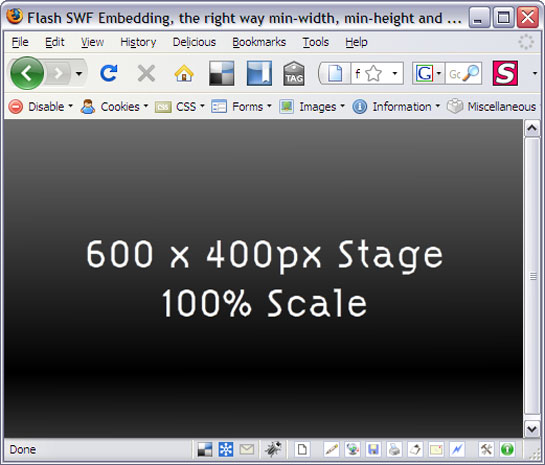
You’re SWF is now properly embedded with SWFObject, however there is a problem which often overlooked when creating full screen Flash web sites. If the browser window is smaller then the dimensions of the Flash SWF stage, no scrollbars will appear on the browser and the Flash stage will simply be cut off.
Resizing the browser window below the size of our Flash stage cuts off the edges of our Flash stage:
Step 5 Setting the minimum size of our Flash movie
Now we have our help functions we can call on them to set the minimum size of our Flash movie. This is as simple as adding the following line after our SWFObject.embedSWF call:
setFlashSize(600,400);
Substitute the required width and height into the function parameters replacing the 600 and 400 respectively.
Congratulations!
Your HTML template should now look like this:
<!DOCTYPE html PUBLIC "-//W3C//DTD XHTML 1.0 Strict//EN"
	"http://www.w3.org/TR/xhtml1/DTD/xhtml1-strict.dtd">
<html xmlns="http://www.w3.org/1999/xhtml" lang="en" xml:lang="en">
	<head>
		<title>Flash SWF Embedding, the right way min-width, min-height and scroll bars</title>
		<meta http-equiv="flashMovie-Type" flashMovie="text/html; charset=iso-8859-1" />
		<style type="text/css" media="screen">
			html, body{
				margin:0;
				padding:0;
				height:100%;
			}
			#flashContainer{
				width:100%;
				height:100%;
			}
		</style>
		<script type="text/javascript" src="SWFObject.js"></script>
		<script type="text/javascript">
		//<![CDATA[

		function setFlashSize(flashWidth,flashHeight){
			var size = [0,0];
			if( typeof( window.innerWidth ) == 'number' ) {
				size = [window.innerWidth, window.innerHeight];
			} else if( document.documentElement && ( document.documentElement.clientWidth || document.documentElement.clientHeight ) ) {
				size = [document.documentElement.clientWidth, document.documentElement.clientHeight];
			} else if( document.body && ( document.body.clientWidth || document.body.clientHeight ) ) {
				size = [document.body.clientWidth, document.body.clientHeight];
			}
			window.onresize = function() {
				document.getElementById("flashContainer").style.minWidth = flashWidth+"px";
				document.getElementById("flashContainer").style.minHeight = flashHeight+"px";
				document.getElementById("flashContainer").style.width = size[0] < flashWidth ? flashWidth+"px" : "100%";
				document.getElementById("flashContainer").style.height = size[1] < flashHeight ? flashHeight+"px" : "100%";
			};
			window.onload = function(){
				window.onresize();
			}
		}
		SWFObject.embedSWF("example.swf", "flashMovie", "100%", "100%", "6.0.0","expressInstall.swf");
		setFlashSize(600,400); //set the minimum width and height of your Flash movie
		//]]>
		</script>
	</head>
	<body>
		<div id="flashContainer">
			<div id="flashMovie">
				<h1>Alternative flashMovie</h1>
				<p><a href="http://www.adobe.com/go/getflashplayer"><img src="http://www.adobe.com/images/shared/download_buttons/get_flash_player.gif" alt="Get Adobe Flash player" /></a></p>
			</div>
		</div>
	</body>
</html>
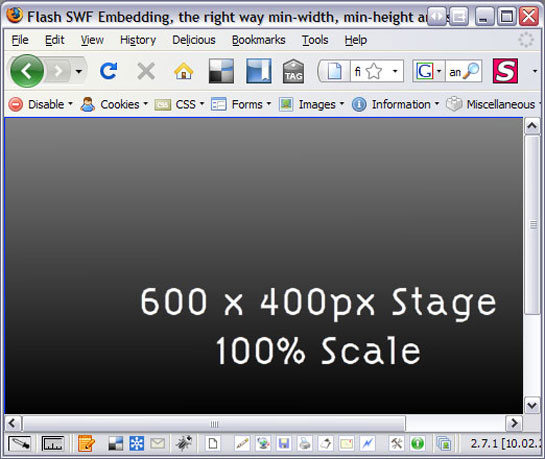
If you test this in your a browser and re size the browser window to something under 600px wide and 400px high you will see the scroll bars appear.
Extra Optimization: Setting the minimum size of our Flash movie
As a final step add alternate Flash content or SEOptimized content into the flashMovie div, for example:
		<div id="flashContainer">
			<div id="flashMovie">
				<h1>Alternate Content Goes Here!</h1>
				<p>Users without Flash or JavaScript, Search Engine Crawlers will see this text instead of my Flash movie</p>

				<p>Insert SEO Optimised keywords and information about your web site here for Search Engine indexing.</p>
			</div>
		</div>
Conclusion
You now have a Search Engine Optimized, flash embed page with provisions for users without Flash or JavaScript. And if visitor with a smaller resolution browser window then your Flash stage they will be able to scroll around the web site as if it were a standard HTML based site.
Further reading:
Embedding with SWFObject (official documentation)
Related posts

Latest / by - 4 February, 2016 1:04 pm
Some of the more popular alternatives to point of sale checkout
Decades ago we were all used to queueing at the traditional point of sales (POS). The high street cash register was king when it came to paying for purchases, in…
Latest / by - 3 October, 2012 5:32 am
Are You Insured Against Cyber-Attacks?
With a number of high-profile data breaches in the past year, businesses should be making sure their networks are adequately protected. Last year, Sony experienced one of the largest data…

Effects / by - 14 January, 2012 5:55 pm
Learn Digital Painting in Photoshop
It’s impossible for everyone to become an artist, but many of them have a will to become an artist, to draw beautiful paintings but again due to lack of command…

Effects / by - 28 December, 2011 2:28 pm
How to Make a New Year Greeting Card in Photoshop
This is so much easy to go in a market and by paying some bucks; purchasing a New Year Greeting Card or any other festival card for your loving person…
Latest / by - 18 August, 2011 8:55 am
How to Block ETag Cookies in Chrome
Most people don’t even know it exists but the new ETag technology is a serious privacy invasion that places undeletable cookies on your computer. The analytics provider KISSmetrics was the…

Flash / by - 10 August, 2011 4:13 pm
Creating a Gallery in Flash Using the Moto CMS Component
In this tutorial we will create a gallery with the help of the Moto CMS Component. I think many of you have heard about (or even worked with) Moto Flash…

3D / by - 24 July, 2011 5:21 pm
Visualize Your Web Page in 3D
Ever wondered if you could visualize your website in 3D? Well, here’s one such Firefox extension that allows you to do so. Tilt is a Firefox add-on that lets you visualize any web page DOM and provides the relationship between various parts of a website in 3D.
Latest / by - 17 June, 2011 9:26 am
Are TechCrunch Hypocrites? The Groupon Series
TechCrunch have commissioned and been running posts (So Far a 4 part series) about how Groupon is the devil and certain of collapse… In the most recent article published 2…

Gaming News / by - 8 March, 2011 1:28 pm
Effects of Violent Video Games Proved By Research Study
Effects of Violent Video Games A research study on the effects of violent video games has shown an increase of aggression. This is caused by playing a violent video game,…

Interfaces / by - 1 March, 2011 2:18 pm
Beginners Guide To User Interface Design in C#
User Interface Design in C# Windows Form Application From Scratch In this C Sharp tutorial you will learn user interface design in C# application. This step-by-step tutorial will help you deeply understand…

Effects / by - 1 December, 2010 2:34 pm
Create an intelligent XML image Gallery & Slideshow in Flash CS4 (+PHP) – Part II/II
In this second part article you will learn how to build an image gallery that will load images from a web server. I decide to call it “Intelligent” because you don’t need to configure any XML or flash file. Just put the Flash movie and the images on a server and they will be loaded automatically. Nice ah?
Flex / by - 29 May, 2010 2:56 pm
Connecting Flex Calendar With Database Using AMF-PHP
Connecting Flex Calendar with Database using AMF-PHP Part I: Create a Dynamic Event Calendar in Flex Builder 3 with Actionscript 3.0 This is Part II of Create a Dynamic Event…
Server Side / by - 13 April, 2010 2:39 pm
CodeIgniter Tutorial – CodeIgniter Explained
Hello everyone, and welcome to the first CodeIgniter tutorial. What will you learn? 1. What is a PHP Framework? 2. What is CodeIgniter? 3. What is MVC? 4. MVC Pattern…
3D / by - 20 March, 2010 10:00 am
Away3D Shoot’em’Up Tutorial – Powerups
In this article we add some powerups to the game.

3D / by - 15 February, 2010 3:59 pm
Away3D Shoot’em’Up Tutorial – Sound Effects
In this article we add some sound effects to the game.
3D / by - 28 July, 2009 1:00 pm
Create from Scratch a Away3D Shoot’em’Up Game: Part 4
Now that we have the player and some enemies we need for them to be able to interact. This is done through collision detection which you will learn in this fourth part.

Effects / by - 21 July, 2009 1:00 pm
Getting Started With BetweenAS3
There are many popular open source tweening engines in the Flash community today. Numbered among these are Tweener, TweenLite/Tweenmax, Tweensy, and GTween. This is a short look at the capabilities of newcomer to the scene: BetweenAS3. BetweenAS3 is the tweening engine brainchild of Yoshihiro (yossy) Shindo and is available as part of the Spark project (i.e. it is brought to us by one of the same group that brought the world the FLARToolkit for Augmented Reality in Flash and countless other goodies).
Latest / by - 17 July, 2009 12:45 pm
Web Roundups: 7 Free Flash CMS
A Flash CMS is a good option to deliver projects to your clients when they want to manage and change the content easly, without programming knowledge and avoiding to edit the flash files. Today, we show you the free available options which you should bear in mind before decide to go on Premium Products.
3D / by - 15 July, 2009 12:50 pm
Create from Scratch a Away3D Shoot’em’Up Game: Part 3
After you have created the 3D level, in the part 3 of this Away3D series, we will show you how to add the player spacecraft and enemies.
Effects / by - 13 July, 2009 12:30 pm
Create an intelligent XML image Gallery & Slideshow in Flash CS4 (+PHP) – Part I/II
In this article you will learn how to build an image gallery that will load images from a web server. I decide to call it “Intelligent” because you don’t need to configure any XML or flash file. Just put the Flash movie and the images on a server and they will be loaded automatically. Nice ah?


