A simple PHP mail contact form with MySQL
by 17 February, 2009 12:57 am42
Welcome to the first PHP tutorial on TheTechLabs.com. In this tutorial I’m gonna show you how to make a simple php contact form for any website, sending the info by mail and saving it on a MySQL DataBase. This tutorial will be like an intro to a more detailed and complex series of php articles that in the end will result on the interaction of php and flash in a cms system. Hope you enjoy the tutorial.
Requirements
- A text editor to edit php, it’s not necessary a professional editor, with NotePad or NotePad++ it’s ok
- A PC with XAMPP or other web server with PHP support installed, or access to a PHP web server
- Access to the phpMyAdmin
- Access to a MySQL data base
- Download the source files
Pre-Requesites
- Basic PHP knowledge
- HTML forms knowledge
Database structure
Our first step it’s define our Data Base structure. In this case in particular we gonna have fields from the data entered by the user and automatic server data, as the ip address, so we could track some additional info of the user. So our database must looks something like
- id
- name
- url
- comment
- date
- ip
Create the Database
For this step we could use the phpMyAdmin interface to create the data base or use the SQL file provided in the tutorial
- id – integer with size 11 and auto increment used as index of the table
- name – Varchar with 100 chars, it can’t be null
- email – Varchar with 100 chars, it can’t be null
- url – Varchar with 200 chars
- comment – Text
- date – DateTime
- ip – – Varchar with 255 chars
Or just run the script on the phpMyAdmin SQL section:
CREATE TABLE IF NOT EXISTS `contacts` (
  `id` int(11) NOT NULL auto_increment,
  `name` varchar(100) NOT NULL,
  `email` varchar(100) NOT NULL,
  `url` varchar(200) default NULL,
  `comment` text,
  `date` datetime NOT NULL,
  `ip` varchar(255),
  PRIMARY KEY  (`id`)
) ENGINE=MyISAM  DEFAULT CHARSET=latin1 AUTO_INCREMENT=1 ;
The form
Our form gonna have 3 input fields and 1 text area:
- Name
- Website url
- Comment
So, now we could start with the form. The action gonna pass the data to itself via POST, so we gonna need and additional hidden field called action, so when the data it’s submitted, we check that variable to know if something it’s sent and act accordingly.
<form id="contact" name="contact" action="contact.php" method="post">

<p><label>Name: <input type="text" id="name" name="name" value="" /></label></p>

<p><label>Email: <input type="text" id="email" name="email" value="" /></label></p>

<p><label>Website: <input type="text" id="url" name="url" value="http://" /></label></p>

<p><label>Comment:<br /><textarea id="comment" name="comment"></textarea></label></p>

<input type="hidden" id="action" name="action" value="submitform" />

<p><input type="submit" id="submit" name="submit" value="Submit" /> <input type="reset" id="reset" name="reset" value="Reset" /></p>

</form>
Now our form must looks something like this one:
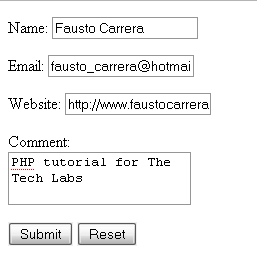
Notice the hidden input with the action id, it have the submitform value, this gonna help us to determine if we save the data or not
The data base connection
Now we have to define a data base connection before we could save the data, we gonna need the login, the password and the name of the database. So, in a new file called connection.php we define the new connection, this is because we probably gonna re use the connection in other pages, it’s better define it in a file we could include later in any php page.
$hostname = "localhost";
$database = "db_contacts";
$username = "root";
$password = "back2skl";
$connection = mysql_connect($hostname, $username, $password) or trigger_error(mysql_error(),E_USER_ERROR);
The additional functions
When we work with databases, it’s quite possible we have serious security problems. One of the most common attacks it’s the SQL injection, one way to avoid SQL injections is sanitize the data we enter on a form, this function cast the different values we enter and return teh right type, so if someone enter a SQL command to delete the data on the database, the command gonna be stored as text and don’t gonna execute
function sanitize($value, $type)
{
  $value = (!get_magic_quotes_gpc()) ? addslashes($value) : $value;

  switch ($type) {
    case "text":
      $value = ($value != "") ? "'" . $value . "'" : "NULL";
      break;
    case "long":
    case "int":
      $value = ($value != "") ? intval($value) : "NULL";
      break;
    case "double":
      $value = ($value != "") ? "'" . doubleval($value) . "'" : "NULL";
      break;
    case "date":
      $value = ($value != "") ? "'" . $value . "'" : "NULL";
      break;
  }

  return $value;
}
Notice that we use the PHP function add slashes before we enter to the switch, in this way we have a string with backslashes before characters that need to be quoted in database queries, the we enter ans set the type of data we need according to the type
Recieving the data
Now we include the connection file and check if there’s something to save and send by mail, all at the beginning of the contact file.
//include the connection file

require_once('connection.php');

//save the data on the DB and send the email

if(isset($_POST['action']) && $_POST['action'] == 'submitform')
{
	//recieve the variables

	$name = $_POST['name'];
	$email = $_POST['email'];
	$url = $_POST['url'];
	$comment = $_POST['comment'];
	$ip = gethostbyname($_SERVER['REMOTE_ADDR']);
}
We use another PHP function to get the ip of the visitor using the gethostbyname($_SERVER[‘REMOTE_ADDR’])
Saving data
So, by now we received the data from our form, now we gonna save the data on our data base
//save the data on the DB

mysql_select_db($database, $connection);

$insert_query = sprintf("INSERT INTO contacts (name, email, url, comment, date, ip) VALUES (%s, %s, %s, %s, NOW(), %s)",
						sanitize($name, "text"),
						sanitize($email, "text"),
						sanitize($url, "text"),
						sanitize($comment, "text"),
						sanitize($ip, "text"));

$result = mysql_query($insert_query, $connection) or die(mysql_error());
So, we select our data base, then we make the query and put it on a variable to make the mysql_query or stop if somethings go wrong. Notice two things, first we are using the MySQL NOW(); function for the dateTime field and we are sanitizing each variable we enter on the data base.
Sending email
So, if everything goes fine, we gonna have something like this in our phpMyAdmin

Now we could send an email to the interested person, like the webmaster, about the new comment on the website
if($result)
{
	//send the email

	$to = "[email protected]";
	$subject = "New contact from the website";

	//headers and subject
	$headers  = "MIME-Version: 1.0rn";
	$headers .= "Content-type: text/html; charset=iso-8859-1rn";
	$headers .= "From: ".$name." <".$email.">rn";

	$body = "New contact
";
	$body .= "Name: ".$name."
";
	$body .= "Email: ".$email."
";
	$body .= "Comment: ".$comment."
";
	$body .= "IP: ".$ip."
";

	mail($to, $subject, $body, $headers);

	//ok message

	echo "Your message has been sent";
}
First we check if php insert the data on the data base, then we set who receives and the subject of the email, then we set the headers of the email, so it could be delivered as html, and finally we compose the email. all the code must looks something like this
//include the connection file

require_once('connection.php');

//save the data on the DB and send the email

if(isset($_POST['action']) && $_POST['action'] == 'submitform')
{
	//recieve the variables

	$name = $_POST['name'];
	$email = $_POST['email'];
	$url = $_POST['url'];
	$comment = $_POST['comment'];
	$ip = gethostbyname($_SERVER['REMOTE_ADDR']);

	//save the data on the DB

	mysql_select_db($database, $connection);

	$insert_query = sprintf("INSERT INTO contacts (name, email, url, comment, date, ip) VALUES (%s, %s, %s, %s, NOW(), %s)",
							sanitize($name, "text"),
							sanitize($email, "text"),
							sanitize($url, "text"),
							sanitize($comment, "text"),
							sanitize($ip, "text"));

	$result = mysql_query($insert_query, $connection) or die(mysql_error());

	if($result)
	{
		//send the email

		$to = "[email protected]";
		$subject = "New contact from the website";

		//headers and subject
		$headers  = "MIME-Version: 1.0rn";
		$headers .= "Content-type: text/html; charset=iso-8859-1rn";
		$headers .= "From: ".$name." <".$email.">rn";

		$body = "New contact
";
		$body .= "Name: ".$name."
";
		$body .= "Email: ".$email."
";
		$body .= "Comment: ".$comment."
";
		$body .= "IP: ".$ip."
";

		mail($to, $subject, $body, $headers);

		//ok message

		echo "Your message has been sent";
	}
}

function sanitize($value, $type)
{
  $value = (!get_magic_quotes_gpc()) ? addslashes($value) : $value;

  switch ($type) {
    case "text":
      $value = ($value != "") ? "'" . $value . "'" : "NULL";
      break;
    case "long":
    case "int":
      $value = ($value != "") ? intval($value) : "NULL";
      break;
    case "double":
      $value = ($value != "") ? "'" . doubleval($value) . "'" : "NULL";
      break;
    case "date":
      $value = ($value != "") ? "'" . $value . "'" : "NULL";
      break;
  }

  return $value;
}
Well, that’s all, now you could make your own PHP forms, knowing how to add or remove fields, remember to do the same with the data base. Hope you find this tutorial usefull, and thanks for read.
Related posts

Effects / by - 14 January, 2012 5:55 pm
Learn Digital Painting in Photoshop
It’s impossible for everyone to become an artist, but many of them have a will to become an artist, to draw beautiful paintings but again due to lack of command…

Effects / by - 28 December, 2011 2:28 pm
How to Make a New Year Greeting Card in Photoshop
This is so much easy to go in a market and by paying some bucks; purchasing a New Year Greeting Card or any other festival card for your loving person…
Flash / by - 10 August, 2011 4:13 pm
Creating a Gallery in Flash Using the Moto CMS Component
In this tutorial we will create a gallery with the help of the Moto CMS Component. I think many of you have heard about (or even worked with) Moto Flash…
3D / by - 24 July, 2011 5:21 pm
Visualize Your Web Page in 3D
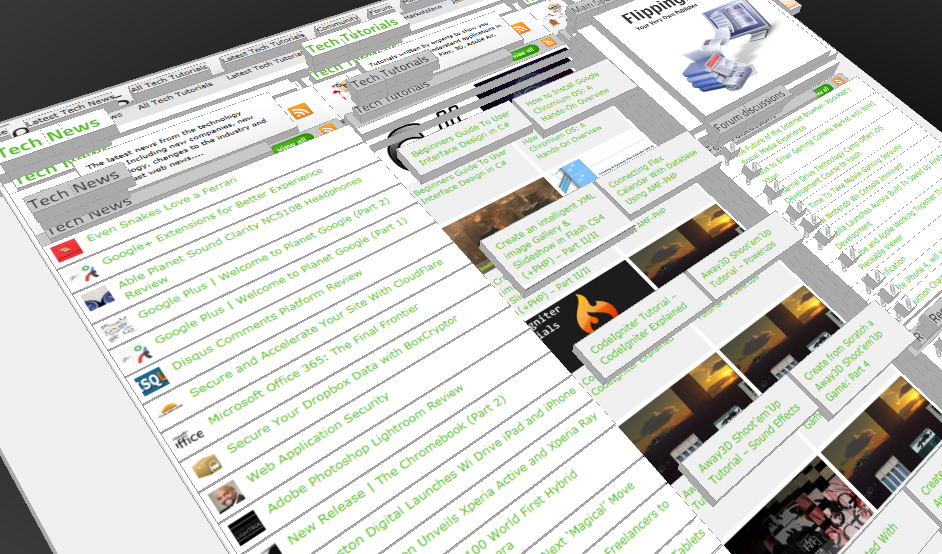
Ever wondered if you could visualize your website in 3D? Well, here’s one such Firefox extension that allows you to do so. Tilt is a Firefox add-on that lets you visualize any web page DOM and provides the relationship between various parts of a website in 3D.
Interfaces / by - 1 March, 2011 2:18 pm
Beginners Guide To User Interface Design in C#
User Interface Design in C# Windows Form Application From Scratch In this C Sharp tutorial you will learn user interface design in C# application. This step-by-step tutorial will help you deeply understand…

Effects / by - 1 December, 2010 2:34 pm
Create an intelligent XML image Gallery & Slideshow in Flash CS4 (+PHP) – Part II/II
In this second part article you will learn how to build an image gallery that will load images from a web server. I decide to call it “Intelligent” because you don’t need to configure any XML or flash file. Just put the Flash movie and the images on a server and they will be loaded automatically. Nice ah?
Flex / by - 29 May, 2010 2:56 pm
Connecting Flex Calendar With Database Using AMF-PHP
Connecting Flex Calendar with Database using AMF-PHP Part I: Create a Dynamic Event Calendar in Flex Builder 3 with Actionscript 3.0 This is Part II of Create a Dynamic Event…
Server Side / by - 13 April, 2010 2:39 pm
CodeIgniter Tutorial – CodeIgniter Explained
Hello everyone, and welcome to the first CodeIgniter tutorial. What will you learn? 1. What is a PHP Framework? 2. What is CodeIgniter? 3. What is MVC? 4. MVC Pattern…
3D / by - 20 March, 2010 10:00 am
Away3D Shoot’em’Up Tutorial – Powerups
In this article we add some powerups to the game.

3D / by - 15 February, 2010 3:59 pm
Away3D Shoot’em’Up Tutorial – Sound Effects
In this article we add some sound effects to the game.
3D / by - 28 July, 2009 1:00 pm
Create from Scratch a Away3D Shoot’em’Up Game: Part 4
Now that we have the player and some enemies we need for them to be able to interact. This is done through collision detection which you will learn in this fourth part.
Effects / by - 21 July, 2009 1:00 pm
Getting Started With BetweenAS3
There are many popular open source tweening engines in the Flash community today. Numbered among these are Tweener, TweenLite/Tweenmax, Tweensy, and GTween. This is a short look at the capabilities of newcomer to the scene: BetweenAS3. BetweenAS3 is the tweening engine brainchild of Yoshihiro (yossy) Shindo and is available as part of the Spark project (i.e. it is brought to us by one of the same group that brought the world the FLARToolkit for Augmented Reality in Flash and countless other goodies).
3D / by - 15 July, 2009 12:50 pm
Create from Scratch a Away3D Shoot’em’Up Game: Part 3
After you have created the 3D level, in the part 3 of this Away3D series, we will show you how to add the player spacecraft and enemies.
Effects / by - 13 July, 2009 12:30 pm
Create an intelligent XML image Gallery & Slideshow in Flash CS4 (+PHP) – Part I/II
In this article you will learn how to build an image gallery that will load images from a web server. I decide to call it “Intelligent” because you don’t need to configure any XML or flash file. Just put the Flash movie and the images on a server and they will be loaded automatically. Nice ah?
3D / by - 8 July, 2009 1:45 pm
Create from Scratch a Away3D Shoot’em’Up Game: Part 2
In the part 1 of these tutorial series articles we created a framework that we could build off to start making the actual game. Now it’s time to create a 3D level for the player to fly through.
3D / by - 6 July, 2009 12:50 pm
Create from Scratch a Away3D Shoot’em’Up Game: Part 1
Today we start a 9 part tutorial series on creating a Shoot’em’Up game. We will cover all the necessary topics to create it from scratch, which will help you to understand and apply these guidelines to other projects. Ath this first part. we look at getting the Away3D engine up and running by creating a UIComponent that will contain and initialize the necessary Away3D components.
Effects / by - 1 July, 2009 1:00 pm
Build a Creative “Swirl Animated Menu” with Flash CS4
Flash it’s a powerful application and can be really complex, but even beginners can create a cool menu for demonstration or for use in a personal site. The menu that we will create is simple, but the swirl animation is something that you don’t see everywhere, for that I’ve decided to explain one way to make an animation of growing swirls without any Action Script code.You will also learn how to import artwork from illustrator where I’ve pre-made the graphics, the work is very simple and the result will be very cool.
Flash / by - 29 June, 2009 12:00 pm
SWFObject and Best Practice Implementation
With more and more full screen Flash web sites appearing on the internet, it’s important to understand how to properly embed the Flash movie in the browser window.
In this tutorial we will cover best practice embedding of SWF movies using SWFObject with a custom function for adding browser scrollbars for smaller browser windows.
3D / by - 24 June, 2009 12:30 pm
Create a 3D Bowling Game with JiglibFlash and Papervision 3D
Possibly the hottest thing to hit the Flash community since the advent of several excellent 3D engines is the recent debut of 3D physics engines. Here we’ll examine a way of using one of the more popular 3D engines, JiglibFlash, in conjunction with the prominent 3D engine Papervision3D to create a bowling game.
Flex / by - 22 June, 2009 1:00 pm
Create a Dynamic Event Calendar in Flex Builder 3 with Actionscript 3.0
This tutorial will allow readers to create an Event Calendar application using Flex. The final user will be able to plan over a daily, weekly or monthly plan.
You will learn on this step by step Flex tutorial, to create from scratch those Graphic User Interfaces, integrate them, and create a complete Rich Internet Application with a professional look.