In this tutorial you will learn how to build an accordion style menu from scratch that can be configured by using an external file.
The menu items can be totally configured in XML with label and can load text, image or swf on it’s open “state”. Just follow the tutorial, it’s quite simple. At the end you will see a second example achieved by this procedure.
Final Result
The final result of this tutorial is a fully functional XML configured flash menu that can load Text, Images or SWF files, like this one:
Pre-Requisites
Adobe Photoshop CS 3/4 if you want to customize your menu – You can download free trial here
You will need Flash CS4 (but it will work also in previous versions).
Also need a menu item designed; can be any image, but I recommend to use mine that can be downloaded here, you will find the .psd file also so you can use your own style, but make sure you have the left side with 20px aprox.
Have the TweenLite Engine that can be downloaded here. Normally we did not need this, but i prefer using it than native AS3 tween classes.
You should feel fine about developing in Adobe Flash even if this tutorial is very simple to follow.

Step 0 – Getting Started
The very first thing is to create a new Action Script 3 Project!
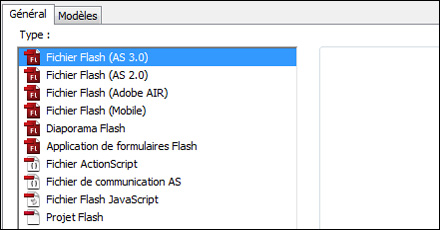
Then make the stage with these dimensions:

![]()
Save the file in a folder called menuAccordion with the name “tutorial”.
Step 1 – Create the menu Item
We will need only one menu item, the others we will re-create them from this one. We should do this way because our menu is dynamic, so… how we will do this, simply, we create a movie clip to behave as menu item, then export it to action script use, and then just need to duplicate him in action script.
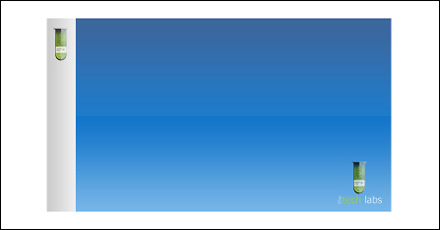
The first thing to do is to import the image that I’ve made, go to menu File->Import-> Import to stage, this way the image is placed immediately on stage. I’ve used the “itemback1.jpg”:
Now convert it into a MovieClip, right-click on it, Convert to Symbol, and choose MovieClip, name it menuItem (important!), and click export to Action Script (Important), the things should be like the image (my OS is French, but the options are in the same place, should be easy to follow):
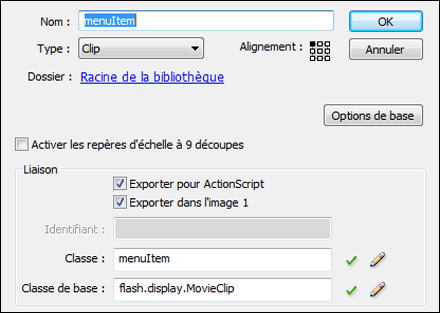
The correct names are very important because we will use it in Action Script. If an warning is shown, press ok.
Our menu needs some parts, a Text field to receive the label, then a textarea to display text is the user define it on the XML and a empty MovieClip to load JPG/SWF files, used to display content when menu is open.
Step 2 – Put content loaders in place
I mean, the label for the menu, the text and the empty movie clip:
Edit our recently transformed movie clip (double click on it), create a new layer above the existing, name it label and the first thing is to add a text field on the gray section, write on text: “HOME”, on properties choose dynamic text, with embed characters (important!), align left and single line. Size it according to accordion height and give it a black-gray color.
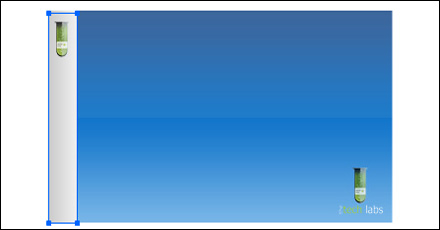
You cannot see the text HOME? You forgot to embed characters right? Embed the uppercase chars only and name this instance itemLabel!
Create a new layer and name it buttonBack, then draw a rectangle over all the gray area:
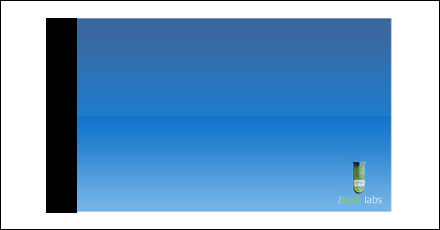
Convert this rectangle into a MovieClip, name it buttonBack (do not export for action script) and then name this instance into “buttonBack” and put the alpha to zero, in Style Combobox.
The next thing to do is to create a content loader. Create a new layer and label it contentLoader, next we need to draw a rectangle, according to the image right size:
Transform it in a MovieClip called itemLoader, name the instance name to itemLoader and double click on it and click on the Right-Click on it and select Guide, this apparently will do nothing, but when you go back to the menu is simply disappeared, but that is not 100% true, it is there on the layer but with a transparent background…
Now create a new Layer always on the top of all, and name it text, draw here a text like the image, make it as Dynamic text, center align, and if needed embed characters. Name his instance as itemText.
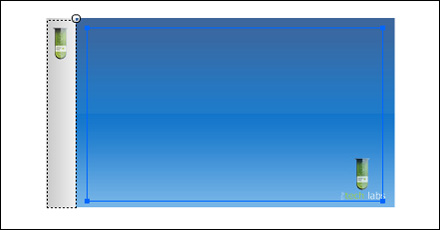
Well, you menu item is done! Just need now to write the XML file, and make some action script code.
Before, just check if your layers order is like this:
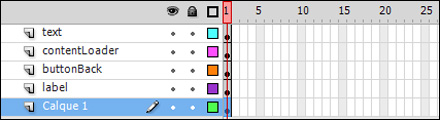
Step 2 – Write the XML
Create a xml file called menu.xml and write this down!:
<?xml version="1.0" encoding="utf-8"?> <menu menuOpen="1" moveOnMouseOver="false"> <item Ititle="home" IcontentType="image/swf" IcontentData="image2.jpg"/> <item Ititle="about" IcontentType="text" IcontentData="Our company is based on UK! Know how we have born!; Click here"/> <item Ititle="Products" IcontentType="image/swf" IcontentData="image5.jpg"/> <item Ititle="Services" IcontentType="image/swf" IcontentData="item2.swf"/> <item Ititle="Contact" IcontentType="image/swf" IcontentData="image1.jpg"/> </menu>
The xml structure is quite simple, the menuOpen property will define the menu tab taht will open automatically on start, then the moveOnMouseOver indicates if the menu item should open when the mouse over it’s tab. Then the items, in Ititle we define the label for the menu, will be used in the itemLabel text field, then the type of content (IcontentType) that the menu will load, if its =”text” the itemText text field will load the IcontentData text, or if is “image/swf” the contentLoader will load the IcontentData object url.
Save this file and put also the gs folder of downloaded Tweenlite AS3 into the same folder as the main Flash file (menuAccordion).
Now go back to Flash, on the main stage we got only one menuItem right? right-click on it an choose Cut (CTRL+X), now create a new MovieClip (menu Insert -> New Symbol and name it menuLoader, press ok and then past our menuItem (CTRL+V), the position is not important.
Go back to main stage, open library panel and drag the menuLoader into the first layer, the things are equal, but this time we got a menu loader where the menu items will be loaded. Name this instance menuContainer.
Lets add a new Layer on the stage and name it mask, on it design a rectangle, convert it to a movieclip and name it masker. Name its instance also as masker. Right-Click on that Layer and then Mask it, this mask will be used to avoid the last menu to be shown when we don’t want!
Now, add a third layer on top of those two, name it Actions, go to actions panel and write this down.
//import tweenlite classes
import gs.TweenLite;
import gs.easing.*;
var MENU_ARRAY:Array; //used to save the items data
var OPENED_MENU:int; //to inform the menu that should be open at startup
var MOVE_ON_MOUSE_OVER:Boolean=false; //tha name says everything
var xmlLoader:URLLoader; //the xml loader
loadXML("menu.xml"); //load the xml
function loadXML(Uri:String):void {
xmlLoader = new URLLoader();
xmlLoader.addEventListener(Event.COMPLETE, onComplete);
xmlLoader.addEventListener(IOErrorEvent.IO_ERROR, onError);
xmlLoader.load(new URLRequest(Uri));
}
function onError(evt:ErrorEvent):void {
trace("cannot load xml file");
}
function onComplete(evt:Event):void {
//read and load xml into array, by parsing it using prepareMenu
MENU_ARRAY=prepareMenu(xmlLoader.data.toString());
placeItemsOnStage(); //place all required items on stage.
}
function placeItemsOnStage():void {
var pos:Number=0;
//define the container properties
menuContainer.x=0;
menuContainer.y=0;
for(var c:int=0; c<MENU_ARRAY.length; c++) {
var it:menuItem = new menuItem; //load out menuItem, because its exported to AS, we can use it here
it.x=c*27; //its the gray border width
it.y=0; //place on top
it.id="Item-"+c; //id the menuItem
it.name="Item-"+c; //name de menuItem
it.posX=pos; //actual pos, useful to open and know is position
it.itemLabel.text=String(MENU_ARRAY[c].Ititle).toUpperCase(); //load the label in uppercase
it.addEventListener(MouseEvent.CLICK, onMouseClick); //add mouse click listener
if(MOVE_ON_MOUSE_OVER==true) it.addEventListener(MouseEvent.MOUSE_OVER, onMouseOver); //if configured, load the mouse over event
it.useHandCursor=true; //use hand cursor
it.buttonMode=true; //buttonMode
it.itemText.visible=false; //hide the textField
menuContainer.addChild(it); //add the menu item as child
if(String(MENU_ARRAY[c].IcontentType)=="image/swf") { //check the content and load things accordint to it
var ldr:Loader = new Loader();
ldr.x=27;
ldr.y=0;
it.addChild(ldr);
ldr.load(new URLRequest(MENU_ARRAY[c].IcontentData.toString()));
}
else if(String(MENU_ARRAY[c].IcontentType)=="text") {
it.itemText.visible=true;
it.itemText.text=MENU_ARRAY[c].IcontentData.toString();
}
pos+=27; //the next menuItem x position
}
//put mask in place
masker.width=(MENU_ARRAY.length*27+325)
masker.height=menuContainer.height;
masker.x=0;
masker.y=0;
moveItem(OPENED_MENU-1); //open menu confirured in XML
}
function onMouseOver(evt:MouseEvent):void {
if(evt.target.name.toString()=="buttonBack") prepareMove(evt)
}
function prepareMove(evt:MouseEvent):void {
var targetName:String = evt.currentTarget.name.toString(); //get the menuItem
var temp:Array = targetName.split("-"); //split his name: Item-x
var itemNumber:int=(temp[1]); //got item number
moveItem(itemNumber); //move it
}
function onMouseClick(evt:MouseEvent):void {
if(evt.target.name.toString()=="buttonBack") prepareMove(evt); //mouse action was done in buttonBack
else trace("Item "+evt.currentTarget.name+" clicked!"); //mouse action was made on accordion area
}
function moveItem(num:int):void {
var itemToMove:menuItem=menuContainer.getChildByName("Item-"+String(num)) as menuItem;
//get the menuItem child
for(var m=0;m<MENU_ARRAY.length;m++) //move one-by-one to the new position
{
var tempMc = menuContainer.getChildByName("Item-"+m);
if(tempMc.x > itemToMove.x) TweenLite.to(tempMc, 1, {x:((tempMc.posX) + itemToMove.width-27), ease:Quart.easeOut}); //see tweenLite for info about this.
else if(tempMc.x <= itemToMove.x) TweenLite.to(tempMc, 1, {x:(tempMc.posX), ease:Quart.easeOut});
}
}
function prepareMenu (XMLData:String):Array
{
//make sure it cames in XML
var menuXML:XML = new XML(XMLData);
//just in case
menuXML.ignoreWhitespace = true;
//get XML item's entrys
var XMLItems = menuXML.descendants("item");
//load all items into an array
var itemsArray:Array = new Array();
var itemObj:Object;
for(var i in XMLItems)
{
itemObj=new Object();
itemObj.Ititle=XMLItems[i].@Ititle;
itemObj.IcontentType=XMLItems[i].@IcontentType;
itemObj.IcontentData=XMLItems[i].@IcontentData;
itemObj.itemID="menu"+i;
itemsArray.push(itemObj);
}
OPENED_MENU=menuXML.@menuOpen; //get menu for open.
MOVE_ON_MOUSE_OVER=(menuXML.@moveOnMouseOver.toString()=="true" ? true : false); //get the option for load or not mouseOver open
return itemsArray;
}
//finish.
stop();
The code is commented, so read it carefully before perform some actions, after that you just need to have some fun and make your own accordion menus! In the XML you can add, remove and edit accordion labs and items easily.
The last thing we need to do is to double-click the menuContainer / menuLoader and delete the menuItem there, we do not need it here because we will add it as child via AS3. Change the stage height to 200px (it’s the menu height).
One more example:
Hope you like it! You can download the final flash project here. Don’t forget to help us grow, by submitting this article to your favorite social networking using the bellow buttons.


June 17th, 2009 at 9:32 pm
First off great tutorial!
However i had a problem though. In this part,
“Transform it in a MovieClip called itemLoader, name the instance name to itemLoader and double click on it and click on the Right-Click on it and select Guide, this apparently will do nothing, but when you go back to the menu is simply disappeared, but that is not 100% true, it is there on the layer but with a transparent background…”
i double clicked and right clicked and no Guide option was availible any idea why?
June 18th, 2009 at 7:22 am
Hi, it’s normal you have that problem, the right-click should be made on the layer and not on the movieclip.
The text in there is not correct, should be:
“and Right-Click on the rectangle layer and select Guide” instead “and click on the Right-Click on it”
Sorry for that, it will be corrected soon.
Thanks for the report.
June 18th, 2009 at 9:19 am
Big thanks for great tutorial. I have waiting for this.
June 20th, 2009 at 11:56 pm
This is really great tutorial..
Can you please explain a little bit the moveItem function?
What is the relation between tempMc and itemToMove?
excuse this newbie
Thanks alot
June 21st, 2009 at 6:50 am
Thank you so much for this tutorials.
I do have one question for you. Is there an option in the code to change the side bar text size and color? (Examples – Home.About,Products etc..)
June 21st, 2009 at 11:07 am
Hi muro!
So, the tempMC grabs each child of the menuContainer as menuItem, one by one and compare its position relative to teh item we send to move, if the x position is bigger it means that the temp menu is at right of the menu we want to expando, and for that we move it to right:
((tempMc.posX) + itemToMove.width-27)
the posX is the menu position from the beginning, when we put them in place remember? we separated them by 27 pixels, the size of the gray border. then we add send this tempItem to right with the x tween, giving him a new position at right of the expanded item: +itemToMove.width-27.
If the temp item .x is not bigger that item.x just send it to left at original position: tempMc.posX.
It’s more easy to understand now? hope so!
Tony, you can change the XML to add the font size and color (like: Icolor, Isize), then just create a new text style on action script and apply it to that label, do this on placeItemsOnStage function:
before the first loop:
var labelStyle:TextFormat;
inside the loop:
labelStyle = new TextFormat();
labelStyle.color = MENU_ARRAY[c].Icolor; //this must be an hexadecimal color: 0xffcc00
labelStyle.size = MENU_ARRAY[c].Isize; //number: 12, 25, 50, …
item.itemLabel.setTextFormat(labelStyle); //apply the textFormat.
This should work.. not tested but should
Hope it helps.
June 21st, 2009 at 1:21 pm
Hi Mario;
You are realy intelligent person…
After one night sleeplessness I have understand this animation logic,
We are Waiting for more tutorial from you,
Thanks in advance
June 22nd, 2009 at 5:41 am
Thank you so much for the reply Mario, it work perfectly.
June 26th, 2009 at 11:25 pm
Nice tutorial but am new to flash where is the combobox?
June 27th, 2009 at 9:26 am
Hi Vega,
The combobox?
June 27th, 2009 at 7:51 pm
alpha to zero, in Style Combobox don’t know where it is
June 27th, 2009 at 9:23 pm
Do you use the Flash CS4 ?? In CS4 when you click on the movie clip you will find in the right-panel the style combobox
If not, and if you are using CS3/CS2, look under the color panel and you will find the alpha entry.
July 1st, 2009 at 11:18 am
Hey Mário!
I have a question… Is there any way that this Gray part where you click and activate motion has some rollOn or rollOut feature? Like that on mouseOver color is changed or Gray expand a bit?
Otherwise absolutely great tutorial!
July 2nd, 2009 at 8:06 am
Hi Mandela,
Well, in this case is a little difficult because it’s an image, but i will try to explain in a few words an alternative way.
You can use your own back movieclip instead my image, create a movieclip with same style that my back image has (same size), in this movieclip you can create some animation where you want (on first frame the normal one, on the second frame the “over” state, then put stop() action on both), then just repeat the tutorial with your movieclip instead my image, that should be very easy.
Now, because we got a “transparent button” over the gray area, we need to detect the mouseOver and mouseOut action and send your backMovieclip to the correct “state/anim”, for the mouseOver you can use the existing listener (see if it is activated, if not activate it because it will be active only when you define it on the XML) if you want it allways active just remove the if:
if(MOVE_ON_MOUSE_OVER==true) it.addEventListener(MouseEvent.MOUSE_OVER, onMouseOver);
function onMouseOver(evt:MouseEvent):void {
if(evt.target.name.toString()==”buttonBack”) prepareMove(evt)
(evt.target as menuItem).myBackMcInstance.gotoAndStop(overFrameHere);
}
And for the mouseOut, just add a new listener:
it.addEventListener(MouseEvent.MOUSE_OUT, onMouseOut);
and the function:
function onMouseOut(evt:MouseEvent):void {
(evt.target as menuItem).myBackMcInstance.gotoAndStop(normalFrameHere);
}
This should work fine. Try and send in your feedback.
July 3rd, 2009 at 12:58 am
Hi,
first, thanks for this great tutorial, i searched over internet, and in my humble opinion, this is the best far.
second, i got a question, how to make this menu larger?
with 920×450 pixels.
i try to enlarge directly the objects in flash, after enlarged the stage, but messed up with all things. Sorry for this noobish, i’m very new to flash program.
thanks a lot in advance.
Peter
July 3rd, 2009 at 7:14 pm
Hi Peter, Thanks!
So, to make the menu bigger you need to remake all the steps but with a back image bigger, and make all the things equal changing only the size of items.
Try to do it, anything just say.
July 4th, 2009 at 5:43 pm
Hi when I download the source files it says invalid file format. Im using Flash CS3 any ideas why this is?
July 4th, 2009 at 5:45 pm
HI Aaron,
As title indicates, this tutorial was based on Flash CS4 version.
July 10th, 2009 at 12:33 pm
Hey Mario
great article and blog site. I have one question….
Before I go off and start trying to modify (hack) your code, is it possible to extend the contentTypes to push an internal Movieclip into the holder?
Eg if I change :
if(String(MENU_ARRAY[c].IcontentType)==”image/swf”)
to
if(String(MENU_ARRAY[c].IcontentType)==”movieclip”)
and extend the if/else clause on line 53 onwards, would this work?
Would I need to change the loader call?
Just getting to grips with AS3 at the moment so apologies for the seemingly obvious question.
I’ve also tweaked the code to run vertically which I’ll send to you add the end with the additional content type clause and xml file.
Many thanks
Simon
July 13th, 2009 at 12:51 pm
How can i set up this menu, so each of the elements links to different pages??
/ RG
July 14th, 2009 at 10:29 am
Simon, when you say “internal MovieClip” you mean an embed movie clip, or another SWF compilled externaly? (it already works with external swf’s)
if you want to load an internal movieclip you need to export your movieclip to action script (in properties of the mc: like on step 1) and add something like this :
if(String(MENU_ARRAY[c].IcontentType)==”movieclip”) {
var myMc:MEU_MOVIE_CLIP = new MEU_MOVIE_CLIP;
myMC.x=27;
myMC.y=0;
it.addChild(myMC);
}
This should work fine.
***************************************************************
Hi,rogergrostad!
So, you just need to do some action to eventListener of the container, something like this should work fine:
replace the onMouseClick function by this one:
function onMouseClick(evt:MouseEvent):void {
if(evt.target.name.toString()==”buttonBack”) prepareMove(evt);
else {
navigateToURL(new URLRequest(evt.currentTarget.name+”.html”),”_new”); //Item-0.html, Item-1.html, Item-xxxx.html
}
}
You will need pages Item-0.html, Item-1.html and so on…
the evt.currentTarget.name receives the name of the clicked item, starting from Item-0 to Item-X, where X means the total of menus entries minus one.
Hope that this help you guys!
July 15th, 2009 at 4:25 pm
Very awesome tutorial, but I don’t supposed there is a way to rotate it 90 degrees (vertical as opposed to horizontal). I tried to follow along and create it this way, and I made a mess. Then I tried to download and change yours (thinking I had done something wrong), and made a bigger mess. This is the ONLY tutorial I could find on this, unless I want to use java (which I don’t). I appreciate you taking the time to post this!
Thanks
July 21st, 2009 at 2:22 am
First off all great work…
Flash CS3 will not open the FLA. I have tried redownloading and still nothing. Can i please be emailed a CS3 file.
Great Work once again
July 22nd, 2009 at 7:24 pm
Hi!!!
Very good tutorial. It’s very dificul to find something like this.
But I’m having some problems. How can I change the distance between a part and other. I ‘m tryng to make this bigger, It’s fine I just need this help. I wolud be great if you could aswer me.
Sorry for my english
Greetins from Brazil
July 22nd, 2009 at 7:33 pm
Manny, just download the tutorial flash CS3 Version here:
http://www.msdevstudio.com/mywork/tutorial_CS3.rar
Hope it works, the rest of the files will work similar…
July 26th, 2009 at 8:47 am
Hi;
There is the problem with “width” of my project.
I see that the register point is “left” in this project.
in mine, i cant see the right section of menu:
stage width:1200px
menu width: 1000px
my menu looks like this
http://img27.imageshack.us/i/27607488.gif/
when i expand the playe :
http://img27.imageshack.us/i/30629616.gif/
what is wrong? XML and actionscript codes is the same (mask and menu size are optimized for my menu)
July 27th, 2009 at 10:59 am
Hi Mario,
Thank you for the great tutorial.
I just want to give you my feedback in following this tutorial.
When you show the picture of the layers in the end, I suppose that is in Scene 1 or is it in the movie clip layers?
to me, it seems as if the sidebar ( home ) is one instance, and then you put layers inside
Then the texfield is one instance – and you name the layers..
So all in all .. i do not get the same result with the layers as you show in your print scrn picture.
I haven’t worked with flash since 2 years .. so, if you think my question is stupid.. thats why.
Br
Yael
July 29th, 2009 at 7:06 am
Thank you for sharing this!
July 30th, 2009 at 11:06 am
great tutorial thank you!
how do i make this vertical?
July 31st, 2009 at 6:33 am
Hi Mario,
first i wonna tank you for this tutorial..its easy and effective
)..this days i making my site and it will be build on your tutorial
)
)
i wonna ask 1 question..i will be greatfull if you can help..
in my site i will load only swf files.Each swf file will be 1 page..but i wont to swf animation start everytime i rollover or click on new page(home,about us etc.),Can you pls help me with this.
Tnx in advance
August 4th, 2009 at 8:54 am
“How can i set up this menu, so each of the elements links to different pages??”
Thank you for answering all our posts…and i have another n00b question for you
How do I link each element to external URL’s – “http://www.blabla.com” etc…??
/RG
August 5th, 2009 at 9:02 pm
I would first like to say this is a great tutorial, and has helped me out greatly. I have a question for you though. I am building this at a much larger scale 1000px x 600px, and for some reason, when I load up the menu, it automatically defaults to the second tab and completely bypasses the first tab. Can you help with any suggestions??
Thank you sooo much in advance.
August 6th, 2009 at 5:49 pm
Hello…
This is a great tutorial but i have a problem…
When i did everything by the book in the end it worked fine.
But I wanto to change the size of the Accordion…
Want to put it with 600×400 and when i do that it just doesn’t work…
Can any one help…
Olá Mário, sou português, pode responder em português se quiser…
Obrigado
August 10th, 2009 at 4:35 pm
Hi Mario,
Its a great tutorial….Thank you for it.
August 11th, 2009 at 5:58 pm
thxs really this is great!
i would like to know how can i add sound to mouse rollover
August 13th, 2009 at 4:50 am
I know html and I’m learning flash (know how to use it pretty well). This tutorial is exactly what I want to learn how to do. I can build it in flash, no problem, but the xml file just shows the text I pasted in xml.
Also, I try to publish the flash file, and get errors (looking for gs and such). How do I make this menu usable on my website, and where do I go from here to expand on that knowledge?
thanks in advance.
s.
August 13th, 2009 at 3:53 pm
When I run the xml, I only get a document w/ the xml text. What am I doing wrong?
August 13th, 2009 at 10:27 pm
Nevermind . . . Got it! Thanks for sharing your knowledge and hard work.
August 14th, 2009 at 7:28 pm
Wait a minute . . . how come yours opens on the About (Item-1)?
August 15th, 2009 at 4:36 pm
good menu!
August 17th, 2009 at 3:24 am
Hi Mario
it’s a great tutorial thanks for it
please if you can let me know how can i add sound to menu item
August 24th, 2009 at 8:47 pm
Hey Mario .. excellent tutorial. I was blown away at how simple yet advanced it was. One thing I cannot figure out is how to get the swf to start on the first menu item. Sorry if it was already addressed .. I couldn’t see anything.
thanks again for a brilliant tutorial.
viva Portugal
- B.Nogueira
August 24th, 2009 at 9:04 pm
Never mind .. I figured it out.
Change the menu2.xml.
August 31st, 2009 at 1:53 pm
Great tutorial Mario!how can setup it up when i press on each item it will gotoAndPlay(“Frame label”) of an external movieclip. cause all external loaded movieclip has an animation,sound…and has a stop action on 1st frame ofcourse. is their way to control them thru the accordion menu.( other movie clip load data from xml, and got their own external as classes.
thanks alote
September 1st, 2009 at 8:45 pm
Mario,
I’ve seen a few people ask you this and was wondering. Is there a simple way to rotate this so it can be used as a verticle menu. I would imagine that your action script would need to be modified in some way so that everything would move in the correct directions.
Could you either post a vertical menu tutorial or at least a source for it if possible.
Thank you again for the awesome tutorial.
Regards,
Thor
September 15th, 2009 at 12:39 pm
Previous quote:
———————————-
“Tony, you can change the XML to add the font size and color (like: Icolor, Isize), then just create a new text style on action script and apply it to that label, do this on placeItemsOnStage function:
before the first loop:
var labelStyle:TextFormat;
inside the loop:
labelStyle = new TextFormat();
labelStyle.color = MENU_ARRAY[c].Icolor; //this must be an hexadecimal color: 0xffcc00
labelStyle.size = MENU_ARRAY[c].Isize; //number: 12, 25, 50, …
item.itemLabel.setTextFormat(labelStyle); //apply the textFormat.
This should work.. not tested but should
”
———————————————–
I want to alter the text size etc, but I am not so advanced at the understanding of actionscript yet. Everything else works perfect, I just want to alter the text format on the MenuItem buttons. Where within the AS do place the above code you suggested?
Great easy to understand tutorial by the way, cheers!
September 15th, 2009 at 3:53 pm
I got a horizontal version up and running, but the backButton is registering clicks above the mc. if anyone has any insight as to how to fix that, i would love it. it is at http://creativetime.org/programs/archive/2009/summit. here is the code to make it horizontal;
//import tweenlite classes
import gs.TweenLite;
import gs.easing.*;
var MENU_ARRAY:Array; //used to save the items data
var OPENED_MENU:int; //to inform the menu that should be open at startup
var MOVE_ON_MOUSE_OVER:Boolean=false; //tha name says everything
var xmlLoader:URLLoader; //the xml loader
loadXML(“menu.xml”); //load the xml
function loadXML(Uri:String):void {
xmlLoader = new URLLoader();
xmlLoader.addEventListener(Event.COMPLETE, onComplete);
xmlLoader.addEventListener(IOErrorEvent.IO_ERROR, onError);
xmlLoader.load(new URLRequest(Uri));
}
function onError(evt:ErrorEvent):void {
trace(“cannot load xml file”);
}
function onComplete(evt:Event):void {
//read and load xml into array, by parsing it using prepareMenu
MENU_ARRAY=prepareMenu(xmlLoader.data.toString());
placeItemsOnStage(); //place all required items on stage.
}
function placeItemsOnStage():void {
var pos:Number=0;
//define the container properties
menuContainer.x=0;
menuContainer.y=0;
for(var c:int=0; c<MENU_ARRAY.length; c++) {
var it:menuItem = new menuItem; //load out menuItem, because its exported to AS, we can use it here
it.x=0; //its the gray border width
it.y=c*0; //place on top
it.id=”Item-”+c; //id the menuItem
it.name=”Item-”+c; //name de menuItem
it.posY=pos; //actual pos, useful to open and know is position
it.itemLabel.text=String(MENU_ARRAY[c].Ititle).toUpperCase(); //load the label in uppercase
it.addEventListener(MouseEvent.CLICK, onMouseClick); //add mouse click listener
if(MOVE_ON_MOUSE_OVER==true) it.addEventListener(MouseEvent.MOUSE_OVER, onMouseOver); //if configured, load the mouse over event
it.useHandCursor=true; //use hand cursor
it.buttonMode=true; //buttonMode
it.itemText.visible=false; //hide the textField
menuContainer.addChild(it); //add the menu item as child
if(String(MENU_ARRAY[c].IcontentType)==”image/swf”) { //check the content and load things accordint to it
var ldr:Loader = new Loader();
ldr.x=0;
ldr.y=25;
it.addChild(ldr);
ldr.load(new URLRequest(MENU_ARRAY[c].IcontentData.toString()));
}
else if(String(MENU_ARRAY[c].IcontentType)==”text”) {
it.itemText.visible=true;
it.itemText.text=MENU_ARRAY[c].IcontentData.toString();
}
pos+=24.8; //the next menuItem x position
}
//put mask in place
masker.height=(MENU_ARRAY.length*24+600)
masker.width=menuContainer.width;
masker.x=0;
masker.y=0;
moveItem(OPENED_MENU-1); //open menu confirured in XML
}
function onMouseOver(evt:MouseEvent):void {
if(evt.target.name.toString()==”buttonBack”) prepareMove(evt)
}
function prepareMove(evt:MouseEvent):void {
var targetName:String = evt.currentTarget.name.toString(); //get the menuItem
var temp:Array = targetName.split(“-”); //split his name: Item-x
var itemNumber:int=(temp[1]); //got item number
moveItem(itemNumber); //move it
}
function onMouseClick(evt:MouseEvent):void {
if(evt.target.name.toString()==”buttonBack”) prepareMove(evt); //mouse action was done in buttonBack
}
function moveItem(num:int):void {
var itemToMove:menuItem=menuContainer.getChildByName(“Item-”+String(num)) as menuItem;
//get the menuItem child
for(var m=0;m itemToMove.y) TweenLite.to(tempMc, 1, {y:((tempMc.posY) + itemToMove.height-300), ease:Quart.easeOut}); //see tweenLite for info about this.
else if(tempMc.y <= itemToMove.y) TweenLite.to(tempMc, 1, {y:(tempMc.posY), ease:Quart.easeOut});
}
}
function prepareMenu (XMLData:String):Array
{
//make sure it cames in XML
var menuXML:XML = new XML(XMLData);
//just in case
menuXML.ignoreWhitespace = true;
//get XML item’s entrys
var XMLItems = menuXML.descendants(“item”);
//load all items into an array
var itemsArray:Array = new Array();
var itemObj:Object;
for(var i in XMLItems)
{
itemObj=new Object();
itemObj.Ititle=XMLItems[i].@Ititle;
itemObj.IcontentType=XMLItems[i].@IcontentType;
itemObj.IcontentData=XMLItems[i].@IcontentData;
itemObj.itemID=”menu”+i;
itemsArray.push(itemObj);
}
OPENED_MENU=menuXML.@menuOpen; //get menu for open.
MOVE_ON_MOUSE_OVER=(menuXML.@moveOnMouseOver.toString()==”true” ? true : false); //get the option for load or not mouseOver open
return itemsArray;
}
//finish.
stop();
September 15th, 2009 at 4:33 pm
I got a vertical version sort of working, see script below- buttonBack is registering above hit area- cant figure out why please help. http://creativetime.org/programs/archive/2009/summit/
//import tweenlite classes
import gs.TweenLite;
import gs.easing.*;
var MENU_ARRAY:Array; //used to save the items data
var OPENED_MENU:int; //to inform the menu that should be open at startup
var MOVE_ON_MOUSE_OVER:Boolean=false; //tha name says everything
var xmlLoader:URLLoader; //the xml loader
loadXML(“menu.xml”); //load the xml
function loadXML(Uri:String):void {
xmlLoader = new URLLoader();
xmlLoader.addEventListener(Event.COMPLETE, onComplete);
xmlLoader.addEventListener(IOErrorEvent.IO_ERROR, onError);
xmlLoader.load(new URLRequest(Uri));
}
function onError(evt:ErrorEvent):void {
trace(“cannot load xml file”);
}
function onComplete(evt:Event):void {
//read and load xml into array, by parsing it using prepareMenu
MENU_ARRAY=prepareMenu(xmlLoader.data.toString());
placeItemsOnStage(); //place all required items on stage.
}
function placeItemsOnStage():void {
var pos:Number=0;
//define the container properties
menuContainer.x=0;
menuContainer.y=0;
for(var c:int=0; c<MENU_ARRAY.length; c++) {
var it:menuItem = new menuItem; //load out menuItem, because its exported to AS, we can use it here
it.x=0; //its the gray border width
it.y=c*0; //place on top
it.id=”Item-”+c; //id the menuItem
it.name=”Item-”+c; //name de menuItem
it.posY=pos; //actual pos, useful to open and know is position
it.itemLabel.text=String(MENU_ARRAY[c].Ititle).toUpperCase(); //load the label in uppercase
it.addEventListener(MouseEvent.CLICK, onMouseClick); //add mouse click listener
if(MOVE_ON_MOUSE_OVER==true) it.addEventListener(MouseEvent.MOUSE_OVER, onMouseOver); //if configured, load the mouse over event
it.useHandCursor=true; //use hand cursor
it.buttonMode=true; //buttonMode
it.itemText.visible=false; //hide the textField
menuContainer.addChild(it); //add the menu item as child
if(String(MENU_ARRAY[c].IcontentType)==”image/swf”) { //check the content and load things accordint to it
var ldr:Loader = new Loader();
ldr.x=0;
ldr.y=25;
it.addChild(ldr);
ldr.load(new URLRequest(MENU_ARRAY[c].IcontentData.toString()));
}
else if(String(MENU_ARRAY[c].IcontentType)==”text”) {
it.itemText.visible=true;
it.itemText.text=MENU_ARRAY[c].IcontentData.toString();
}
pos+=24.8; //the next menuItem x position
}
//put mask in place
masker.height=(MENU_ARRAY.length*24+600)
masker.width=menuContainer.width;
masker.x=0;
masker.y=0;
moveItem(OPENED_MENU-1); //open menu confirured in XML
}
function onMouseOver(evt:MouseEvent):void {
if(evt.target.name.toString()==”buttonBack”) prepareMove(evt)
}
function prepareMove(evt:MouseEvent):void {
var targetName:String = evt.currentTarget.name.toString(); //get the menuItem
var temp:Array = targetName.split(“-”); //split his name: Item-x
var itemNumber:int=(temp[1]); //got item number
moveItem(itemNumber); //move it
}
function onMouseClick(evt:MouseEvent):void {
if(evt.target.name.toString()==”buttonBack”) prepareMove(evt); //mouse action was done in buttonBack
}
function moveItem(num:int):void {
var itemToMove:menuItem=menuContainer.getChildByName(“Item-”+String(num)) as menuItem;
//get the menuItem child
for(var m=0;m itemToMove.y) TweenLite.to(tempMc, 1, {y:((tempMc.posY) + itemToMove.height-300), ease:Quart.easeOut}); //see tweenLite for info about this.
else if(tempMc.y <= itemToMove.y) TweenLite.to(tempMc, 1, {y:(tempMc.posY), ease:Quart.easeOut});
}
}
function prepareMenu (XMLData:String):Array
{
//make sure it cames in XML
var menuXML:XML = new XML(XMLData);
//just in case
menuXML.ignoreWhitespace = true;
//get XML item’s entrys
var XMLItems = menuXML.descendants(“item”);
//load all items into an array
var itemsArray:Array = new Array();
var itemObj:Object;
for(var i in XMLItems)
{
itemObj=new Object();
itemObj.Ititle=XMLItems[i].@Ititle;
itemObj.IcontentType=XMLItems[i].@IcontentType;
itemObj.IcontentData=XMLItems[i].@IcontentData;
itemObj.itemID=”menu”+i;
itemsArray.push(itemObj);
}
OPENED_MENU=menuXML.@menuOpen; //get menu for open.
MOVE_ON_MOUSE_OVER=(menuXML.@moveOnMouseOver.toString()==”true” ? true : false); //get the option for load or not mouseOver open
return itemsArray;
}
//finish.
stop();
September 16th, 2009 at 8:44 am
Hey Mario!
Why do i get these errors?
1120: Access of undefined property masker.
masker.width=(MENU_ARRAY.length*27+325)
masker.height=menuContainer.height;
masker.x=0;
masker.y=0;
Help pls.
September 27th, 2009 at 7:43 pm
hi gr8 tutorial
but i got an error like this
{Access of undefined property of masker}
pls help
October 5th, 2009 at 5:17 am
I also got these erros….
1120: Access of undefined property masker.
masker.width=(MENU_ARRAY.length*27+325)
masker.height=menuContainer.height;
masker.x=0;
masker.y=0;
Can anyone help please?
October 7th, 2009 at 7:17 pm
Hi all,
Sorry for the delay…
Do you guys named the masker instance to masker??
October 22nd, 2009 at 1:26 am
i’ve tried this XML code and completed the flash file multiple times and it doesnt seem to be working. can it played as an swf file if you TEST MOVIE in Flash CS4? please help.. this is so cool and i dont know how to use it.
October 23rd, 2009 at 11:05 pm
MARIO
EUREKA i got it… i didnt know how to create an XML file … in Dreamweaver duh!!!!
but now i was wondering how do u change the code to activate banner movement on ROLL_OVER instead of by CLICKing on it.
i tried changing this code…
it.addEventListener(MouseEvent.CLICK, onMouseClick); //add mouse click listener
if(MOVE_ON_MOUSE_OVER==true) it.addEventListener(MouseEvent.MOUSE_OVER, onMouseOver); //if configured, load the mouse over event
it.useHandCursor=true; //use hand cursor
but nothing seems to work.
please help…. thank you.
November 2nd, 2009 at 3:05 pm
Hello Mário,
thanks for this tutorial! it’s very well explained.
I have a question however. I’m trying to adapt it to my needs.
I correctly resized the menu to put on my website. However i would like to put on images and text at the same time. Indeed, when I put text in jpeg, the resolution is not very good (specially while zooming), so i’d like to separate jpeg from text.
here’s what i’ve done in the action script.
- I added a Itext property in the xml to I can display Icontentdata and Itext at the same time.
- in the placeItemsOnStage() function :
it.itemText.visible=true;
it.itemText.text=MENU_ARRAY[c].Itext.toString();
menuContainer.addChild(it); //add the menu item as child
var ldr:Loader = new Loader();
ldr.x=50;
ldr.y=0;
it.addChild(ldr);
ldr.load(new URLRequest(MENU_ARRAY[c].IcontentData.toString()));
BUT, the text is displayed under the image and i can’t manage to display it over the image. I don’t know Flash very well (used to Java so I understand actionscript).
Thanks in advance,
Benjamin.
November 3rd, 2009 at 3:33 am
I have a vertical menu that works but I can’t get my flv files to launch off from the menu – HELP!
//import tweenlite classes
import gs.TweenLite;
import gs.easing.*;
import flash.events.*;
import fl.video.*;
var MENU_ARRAY:Array; //used to save the items data
var OPENED_MENU:int; //to inform the menu that should be open at startup
var MOVE_ON_MOUSE_OVER:Boolean=false; //tha name says everything
var xmlLoader:URLLoader; //the xml loader
loadXML(“menu.xml”); //load the xml
function loadXML(Uri:String):void {
xmlLoader = new URLLoader();
xmlLoader.addEventListener(Event.COMPLETE, onComplete);
xmlLoader.addEventListener(IOErrorEvent.IO_ERROR, onError);
xmlLoader.load(new URLRequest(Uri));
}
function onError(evt:ErrorEvent):void {
trace(“cannot load xml file”);
}
function onComplete(evt:Event):void {
//read and load xml into array, by parsing it using prepareMenu
MENU_ARRAY=prepareMenu(xmlLoader.data.toString());
placeItemsOnStage(); //place all required items on stage.
}
function placeItemsOnStage():void {
var pos:Number=0;
//define the container properties
menuContainer.x=0;
menuContainer.y=0;
for(var c:int=0; c<MENU_ARRAY.length; c++) {
var it:menuItem = new menuItem; //load out menuItem, because its exported to AS, we can use it here
it.x=0; //its the gray border width
it.y=c*27; //place on top
it.id=”Item-”+c; //id the menuItem
it.name=”Item-”+c; //name de menuItem
it.posY=pos; //actual pos, useful to open and know is position
it.itemLabel.text=String(MENU_ARRAY[c].Ititle).toUpperCase(); //load the label in uppercase
it.itemLoader.addEventListener(MouseEvent.CLICK, playMyFlv);
function playMyFlv(myevent:MouseEvent):void {
myvideo.source = “video/”+(MENU_ARRAY[c].Ititle.toString())+”.flv”;
}
if(MOVE_ON_MOUSE_OVER==true) it.addEventListener(MouseEvent.MOUSE_OVER, onMouseOver); //if configured, load the mouse over event
it.useHandCursor=true; //use hand cursor
it.buttonMode=true; //buttonMode
it.itemText.visible=false; //hide the textField
menuContainer.addChild(it); //add the menu item as child
if(String(MENU_ARRAY[c].IcontentType)==”image/swf”) { //check the content and load things accordint to it
var ldr:Loader = new Loader();
ldr.x=0;
ldr.y=27;
it.addChild(ldr);
ldr.load(new URLRequest(MENU_ARRAY[c].IcontentData.toString()));
}
else if(String(MENU_ARRAY[c].IcontentType)==”text”) {
it.itemText.visible=true;
it.itemText.text=MENU_ARRAY[c].IcontentData.toString();
}
pos+=27; //the next menuItem x position
trace(“video/”+(MENU_ARRAY[c].Ititle.toString())+”.flv”);
}
//put mask in place
masker.height=(MENU_ARRAY.length*27+800)
masker.width=193;
masker.x=0;
masker.y=27;
moveItem(OPENED_MENU-1); //open menu confirured in XML
}
function onMouseOver(evt:MouseEvent):void {
if(evt.target.name.toString()==”buttonBack”) prepareMove(evt)
}
function prepareMove(evt:MouseEvent):void {
var targetName:String = evt.currentTarget.name.toString(); //get the menuItem
var temp:Array = targetName.split(“-”); //split his name: Item-x
var itemNumber:int=(temp[1]); //got item number
moveItem(itemNumber); //move it
}
function onMouseClick(evt:MouseEvent):void {
if(evt.target.name.toString()==”buttonBack”) prepareMove(evt); //mouse action was done in buttonBack
else trace(“Item “+evt.currentTarget.name+” clicked!”); //mouse action was made on accordion area
}
function moveItem(num:int):void {
var itemToMove:menuItem=menuContainer.getChildByName(“Item-”+String(num)) as menuItem;
//get the menuItem child
for(var m=0;m itemToMove.y) TweenLite.to(tempMc, 1, {y:((tempMc.posY) + itemToMove.width-27), ease:Quart.easeOut}); //see tweenLite for info about this.
else if(tempMc.y <= itemToMove.y) TweenLite.to(tempMc, 1, {y:(tempMc.posY), ease:Quart.easeOut});
}
}
function prepareMenu (XMLData:String):Array
{
//make sure it cames in XML
var menuXML:XML = new XML(XMLData);
//just in case
menuXML.ignoreWhitespace = true;
//get XML item’s entrys
var XMLItems = menuXML.descendants(“item”);
//load all items into an array
var itemsArray:Array = new Array();
var itemObj:Object;
for(var i in XMLItems)
{
itemObj=new Object();
itemObj.Ititle=XMLItems[i].@Ititle;
itemObj.IcontentType=XMLItems[i].@IcontentType;
itemObj.IcontentData=XMLItems[i].@IcontentData;
itemObj.itemID=”menu”+i;
itemsArray.push(itemObj);
}
OPENED_MENU=menuXML.@menuOpen; //get menu for open.
MOVE_ON_MOUSE_OVER=(menuXML.@moveOnMouseOver.toString()==”true” ? true : false); //get the option for load or not mouseOver open
return itemsArray;
}
//finish.
stop();
November 12th, 2009 at 8:26 am
why are the contents still look like parts of a button ( with hand icon and all). i wana put interactive contents, how could i remove that?
anyhu, great example for scripting noob like me.
November 16th, 2009 at 2:02 pm
If I want the accordion to slide automatically when it loads from the first slide to the last and stop at the last, how can I do it?
Your help is appreciated.
December 3rd, 2009 at 12:20 pm
WoW. I know it’s been a while since you posted this, but THANK YOU SOOO MUCH. I have been looking for working script that was easy enough to install and modify on my own. I was able to get the size bigger (1024×768) without ever having coded AS at all, took a while to find out what to modify, but it works great. Thanks again for your help, how about making a diagonal one now? haha I want to figure out how to make that.
THanks again.
Esteban
December 13th, 2009 at 3:58 am
This code is awesome! Saved me a ton of money. I’m loading external SWFs. How do I control these movie clips?
Thanks
December 15th, 2009 at 10:13 pm
man u save me:) this is very good vay to take instance name;
event.currentTarget.name.substr or .split
December 17th, 2009 at 8:40 pm
Thank for for sharing. I appreciate it
January 3rd, 2010 at 5:32 am
Hi, i am a newbie to flash, am trying to follow this tutorial but failed.
Can further explain the following steps?Appreciate much.
“Now go back to Flash, on the main stage we got only one menuItem right? right-click on it an choose Cut (CTRL+X), now create a new MovieClip (menu Insert -> New Symbol and name it menuLoader, press ok and then past our menuItem (CTRL+V), the position is not important.
Go back to main stage, open library panel and drag the menuLoader into the first layer, the things are equal, but this time we got a menu loader where the menu items will be loaded. Name this instance menuContainer.”
Main stage is it means the main scene? with only one layer with a main keyframe which contains all the layers we created? Which layer to cut(Ctr X)I lost here. I follow closely step by step but still not manage to do it.
Thanks lots.
January 3rd, 2010 at 6:34 pm
hola como estan quiciera saber en que parte coloco el codigo para cuando se le de clic al boton llame alguna aplicacion, por ejemplo que se le de clic en products y nos envie a los productos de la empresa o algo asi agradezco su ayuda
January 8th, 2010 at 2:26 pm
hi.
great great tutorial mario. im facing only one problem. i redid the whole thing and resized to 1000 * 400 px. and it loads only the first 2 menus and hangs.. any help would be greatly appreciated.
kind regards
January 11th, 2010 at 12:36 am
Thanks for the great tutorial. I am not very familiar with AS3 i’ve been working with AS2 for years and havent made the switch. What I would like to know is how I can somehow load the image or swf file in a level that is lower than the button level because the button will not work when i move the location of the loaded item all the way to the left. I want my loaded image to show below the button. I am not understanding
var ldr:Loader = new Loader();
ldr.x=0;
ldr.y=0;
it.addChild(ldr);
ldr.load(new URLRequest(MENU_ARRAY[c].IcontentData.toString()));
because i am so used to loadMovie or attachMovie
Can you please explain?
January 11th, 2010 at 10:23 am
Now go back to Flash, on the main stage we got only one menuItem right? right-click on it an choose Cut (CTRL+X), now create a new MovieClip (menu Insert -> New Symbol and name it menuLoader, press ok and then past our menuItem (CTRL+V), the position is not important.
1. right-click on it … right click on what? Where exactly is the thing to click on? Is it in Scene 1, or menuItem? If it’s in menuItem, how do you right click “it”, without one of the layers hiliting?
Go back to main stage, open library panel and drag the menuLoader into the first layer, the things are equal, but this time we got a menu loader where the menu items will be loaded. Name this instance menuContainer.
2. What are you calling the 1st layer? I have an unused Layer 1, and then there is the first layer I made, which was ‘label’.
…….
Now, add a third layer on top of those two, name it Actions, go to actions panel and write this down.
3. where is the actions panel? How do you get there?
Would you mind giving more details, as I am completely lost after these statements. I am using CS4, and I have these main questions. I see they were asked before, but I don’t know that I got a clear answer on these points.
You started out with lots of good graphics, but then they ended when I became a little more detailed. Would you consider adding to this tutorial, with more graphics? If not, could you answer the three questions I have embedded in your last paragraphs.
Thanx much.
January 11th, 2010 at 6:45 pm
From one newbie to another:
Okay, “and put the alpha to zero, in Style Combobox.” is found in the COLOR EFFECT part of the Properties for the buttonBack. There is a Style drop down that has the term Alpha…
January 11th, 2010 at 7:23 pm
Newbie to Newbies:
Found another answer on internet:
Click on the Scene 1 link above the stage to return to the
main stage.
January 11th, 2010 at 7:38 pm
Newbie to Newbies:
Okay, finally, select window->Actions, and paste the code given by the author. Make sure the Actions layer is hilited in the lower left, the last layer you created.
January 14th, 2010 at 12:34 am
okay, final entry,.. It works perfectly in my browser, when run from my desktop, but fails when uploaded to my server. Won’t show the image/swf files, but does show the text entries as indicated in the menu.xml
January 26th, 2010 at 5:02 pm
How do i change the width to 800px and the height to 350px. These numbers are the total width and height of the frame… The buttons are 40px width and 350px height.
Can someone help me?
January 28th, 2010 at 5:39 am
finally found my answer: addChildAt() in case it will help anyone…
January 29th, 2010 at 1:32 am
I love these types of menus; unfortunately I am fairly new to CS4 so some of the layouts I get lost with. I made up to here just before the large Actionscript at the end.
“Now go back to Flash, on the main stage we got only one menuItem right? right-click on it an choose Cut (CTRL+X), now create a new MovieClip (menu Insert -> New Symbol and name it menuLoader, press ok and then past our menuItem (CTRL+V), the position is not important.
Go back to main stage, open library panel and drag the menuLoader into the first layer, the things are equal, but this time we got a menu loader where the menu items will be loaded. Name this instance menuContainer.
Lets add a new Layer on the stage and name it mask, on it design a rectangle, convert it to a movieclip and name it masker. Name its instance also as masker. Right-Click on that Layer and then Mask it, this mask will be used to avoid the last menu to be shown when we don’t want!
Now, add a third layer on top of those two, name it Actions, go to actions panel and write this down.”
If there are any screenshots, advice or even a nicely done Youtube video explaining these steps out there to help me fill in the blanks it would be awesome.
February 8th, 2010 at 12:10 am
Hello everybody. First my gratitude to Mario for this tutorial cos it fits the need I have been looking for however, unfortunately for me I can’t get it to work.For two straight days I still can’t figure out why. I sucked at action-script but this one is very simple to understand the argument but I still can’t get both in horizontal and vertical position to work. I have read the whole blog to find my answers but with no success:-(. Actually the whole thing is after creating the xml. from then on the tutorial seems complicated to follow. I have tried everything I understood. If there is anyone here willing to put things into perspective, I will really appreciate it. Thanks.
February 11th, 2010 at 9:09 pm
Thanks a lot Mario, this is a wonderful menu and a well explained tutorial. I was wondering if it is possible to change the gray button for different images that work as background but stated in the xml file. Something like and what would be the action script?.
February 14th, 2010 at 12:47 am
hey guys, i was encountering the same problem as others regarding re-sizing the project and had to work on it for 2 days until i got it done working in the position and size that I want.
I’m working with AS3.0 in Flash CS4, therefore I have an .as file and a .fla file. Make sure you’re connecting these two, by going to ‘Properties’ in the .fla file, while on the stage (make sure you don’t have anything else selected) and type the name of the .as class/file used.
Here is the one I modified:
It’s called SampleMenu1.as
package{
//import tweenlite classes too
import flash.display.Sprite;
import flash.display.MovieClip;
import flash.events.MouseEvent;
import flash.events.Event;
import flash.events.ErrorEvent;
import flash.events.IOErrorEvent;
import flash.display.Loader;
import flash.net.URLLoader;
import flash.net.URLRequest;
import flash.text.TextField;
import flash.text.TextFieldAutoSize;
import flash.text.TextFormat;
import gs.TweenLite;
import gs.easing.*;
public class SampleMenu1 extends MovieClip
{
private var MENU_ARRAY:Array; //used to save the items data
private var OPENED_MENU:int; //to inform the menu that should be open at startup
private var MOVE_ON_MOUSE_OVER:Boolean=false; //the name says everything
private var xmlLoader:URLLoader; //the xml loader
public function SampleMenu1(){
loadXML(“menu2.xml”); //load the xml
}
private function loadXML(Uri:String):void {
xmlLoader = new URLLoader();
xmlLoader.addEventListener(Event.COMPLETE, onComplete);
xmlLoader.addEventListener(IOErrorEvent.IO_ERROR, onError);
xmlLoader.load(new URLRequest(Uri));
}
private function onError(evt:ErrorEvent):void {
trace(“cannot load xml file”);
}
private function onComplete(evt:Event):void {
//read and load xml into array, by parsing it using prepareMenu
MENU_ARRAY=prepareMenu(xmlLoader.data.toString());
placeItemsOnStage(); //place all required items on stage.
}
private function placeItemsOnStage():void {
var pos:Number=0;
//define the container properties
menuContainer.x=100;
menuContainer.y=100;
for(var c:int=0; c<MENU_ARRAY.length; c++) {
var it:menuItem = new menuItem; //load out menuItem, because its exported to AS, we can use it here
it.x=c*27; //its the gray border width
it.y=0; //place on top
it.id="Item-"+c; //id the menuItem
it.name="Item-"+c; //name de menuItem
it.posX=pos; //actual pos, useful to open and know is position
it.itemLabel.text=String(MENU_ARRAY[c].Ititle).toUpperCase(); //load the label in uppercase
it.addEventListener(MouseEvent.CLICK, onMouseClick); //add mouse click listener
if(MOVE_ON_MOUSE_OVER==true) it.addEventListener(MouseEvent.MOUSE_OVER, onMouseOver); //if configured, load the mouse over event
it.useHandCursor=true; //use hand cursor
it.buttonMode=true; //buttonMode
it.itemText.visible=false; //hide the textField
menuContainer.addChild(it); //add the menu item as child
if(String(MENU_ARRAY[c].IcontentType)=="image/swf") { //check the content and load things accordint to it
var ldr:Loader = new Loader();
ldr.x=27;//here it loads the image or text right after the button which has a width of 27px
ldr.y=0;
it.addChild(ldr);
ldr.load(new URLRequest(MENU_ARRAY[c].IcontentData.toString()));
}
else if(String(MENU_ARRAY[c].IcontentType)=="text") {
it.itemText.visible=true;
it.itemText.text=MENU_ARRAY[c].IcontentData.toString();
}
pos+=26; //the next menuItem x position
}
//put mask in place
masker.width=(MENU_ARRAY.length*26+475)
masker.height=menuContainer.height;
masker.x=100;
masker.y=100;
moveItem(OPENED_MENU-1); //open menu confirured in XML
}
private function onMouseOver(evt:MouseEvent):void {
if(evt.target.name.toString()=="buttonBack") prepareMove(evt)
}
private function prepareMove(evt:MouseEvent):void {
var targetName:String = evt.currentTarget.name.toString(); //get the menuItem
var temp:Array = targetName.split("-"); //split his name: Item-x
var itemNumber:int=(temp[1]); //got item number
moveItem(itemNumber); //move it
}
private function onMouseClick(evt:MouseEvent):void {
if(evt.target.name.toString()=="buttonBack") prepareMove(evt); //mouse action was done in buttonBack
else trace("Item "+evt.currentTarget.name+" clicked!"); //mouse action was made on accordion area
}
private function moveItem(num:int):void {
var itemToMove:menuItem=menuContainer.getChildByName("Item-"+String(num)) as menuItem;
//get the menuItem child
for(var m=0;m itemToMove.x) TweenLite.to(tempMc, 1, {x:((tempMc.posX) + itemToMove.width-27), ease:Quart.easeOut}); //see tweenLite for info about this.
else if(tempMc.x <= itemToMove.x) TweenLite.to(tempMc, 1, {x:(tempMc.posX), ease:Quart.easeOut});
}
}
private function prepareMenu (XMLData:String):Array
{
//make sure it cames in XML
var menuXML:XML = new XML(XMLData);
//just in case
menuXML.ignoreWhitespace = true;
//get XML item's entrys
var XMLItems = menuXML.descendants("item");
//load all items into an array
var itemsArray:Array = new Array();
var itemObj:Object;
for(var i in XMLItems)
{
itemObj=new Object();
itemObj.Ititle=XMLItems[i].@Ititle;
itemObj.IcontentType=XMLItems[i].@IcontentType;
itemObj.IcontentData=XMLItems[i].@IcontentData;
itemObj.itemID="menu"+i;
itemsArray.push(itemObj);
}
OPENED_MENU=menuXML.@menuOpen; //get menu for open.
MOVE_ON_MOUSE_OVER=(menuXML.@moveOnMouseOver.toString()=="true" ? true : false); //get the option for load or not mouseOver open
return itemsArray;
}
}
}
I hope it'll help someone!
thanks again to the creator of this tutorial…it gave me some headaches, but I guess, in the end, this is how you learn!
seasealwolf
February 16th, 2010 at 2:54 pm
This is a great tutorial but I just want to make a bigger version. I have scaled up the stage and the itemback.jpg and all the images to display, however it still shows them at the tutorials’ dimensions.
I assume I need to amend the code, but which code and where???????
any help would be so appreciated
Matt
February 17th, 2010 at 2:25 am
Let us know how it goes Matt… Maybe paste it in the comments?
February 26th, 2010 at 4:14 pm
Well I managed to re-size the tutorial in the end. I had to tweak the mask in relation to the itemBack image. I have now been asked to slow it down and add a whoosh noise as it sweeps across!! really not sure where to start with this one. I am guessing I have to edit something in Tweenlite and as for the sound I guess I need to add it to the buttonBack element.
Hmmm only have 15 days left on my CS4 trial…
February 27th, 2010 at 1:45 am
To everyone prior who was getting the error message:
masker.width=(MENU_ARRAY.length*27+325)
masker.height=menuContainer.height;
masker.x=0;
masker.y=0;
Try extracting everything to one folder on the desktop, if you bury it insided multiple folders you may get this error.
Seasealwolf awesome contribution thank you.
Mr. Mario Santos I cannot possibly thank you enough for sharing this. Thank you.
February 27th, 2010 at 4:43 am
BTW if your external swfs have masks something goes wrong. For anyone out their that was considering loading an swf with a mask.
March 2nd, 2010 at 5:39 am
Is it possible to load an image at the top of each slide and to have text along with the image?
March 4th, 2010 at 12:12 pm
TypeError: Error #1010: A term is undefined and has no properties.
at accordionmenu_fla::MainTimeline/placeItemsOnStage()
at accordionmenu_fla::MainTimeline/onComplete()
at flash.events::EventDispatcher/flash.events:EventDispatcher::dispatchEventFunction()
at flash.events::EventDispatcher/dispatchEvent()
at flash.net::URLLoader/flash.net:URLLoader::onComplete()
?????????????????????????????????????????????????????????????????????
March 11th, 2010 at 6:17 pm
Can anyone advise on how to make the gray sections link to other web pages on click?
March 12th, 2010 at 4:20 am
I have implemented this menu inside my current website and now I need to move it on the screen to x:305 y:138, I have tried to change the masker position, but of course I need to change other components as well, can you point me in the right direction. My stage size is 900 x 630