Expanding the Flash Actionscript 3.0 Videoplayer
by 14 August, 2008 12:40 am117
Alright, here’s the second part of the video player tutorial. We will be adding the following new features:
– Playlist support
– Fullscreen support
– Save volume
– Clickable progress/volume bar
You can preview the final result of this tutorial here.
Requirements
Adobe Flash CS3
Source Files
We also wanted to create a box displaying a message when the video is still buffering. But there has been an issue with the NetStreamEvent. It doesn’t fire the NetStream.Buffer.Empty event when the player’s actually buffering. People from the community say that this problem is somehow related with the encoding software of the flash video files. Since we didn’t find a proper solution, we left this feature out. If someone has an idea how this problem can still be properly solved, feel free to leave us a comment.
Playlist support
Ok, let’s begin with the major new feature. Adding the playlist support is quite simple and nearly implemented the same way as in the slideshow tutorial. So we have our XML file which looks like this:
<playlist>
	<vid src="video/hancock.flv" desc="Hancock (2008) - Movie Trailer"/>
	<vid src="video/redbelt.flv" desc="Redbelt (2008) - Movie Trailer"/>
	<vid src="video/the_dark_knight.flv" desc="The Dark Knight (2008) - Movie Trailer"/>
</playlist>
As you can see, each video has two attributes. One describes the source to the file and the other one is a short description or the title of the movie.
Now it’s time to go on with coding. We changed the line which defines the source of the flash video file to the following:
var strSource:String = root.loaderInfo.parameters.playlist == null ? "playlist.xml" : root.loaderInfo.parameters.playlist;
Like this, flash will look for the flash variable playlist which you can add in the html file. If it’s defined, then the value will be assigned to the variable strSource. Otherwise we just assign a default location. Like this, you can use one compiled SWF file for every playlist you want to publish.
In order to load this file, we need to add three more variables to our video player:
var urlLoader:URLLoader;
var urlRequest:URLRequest;
var xmlPlaylist:XML;
urlLoader will later be used to load and handle the loaded xml file. urlRequest is an object for the urlLoader to load the playlist file. And xmlPlaylist will then contain the loaded xml data from the urlLoader.
We’ve added these code lines add the bottom to the initVideoPlayer() function:
	urlRequest = new URLRequest(strSource);
	urlLoader = new URLLoader();
	urlLoader.addEventListener(Event.COMPLETE, playlistLoaded);
	urlLoader.load(urlRequest);
A new urlRequest will be created with the source location of the xml file. Then we create a new urlLoader, add an event listener when the loading is completed and finally load the file. What’s also important is that we hide the controls of the video player in the first line of the initVideoPlayer() function since we don’t want that the user can click anything if the playlist hasn’t been loaded yet.
As soon as the playlist is loaded we call the playlistLoaded() function which looks like this:
function playlistLoaded(e:Event):void {
	xmlPlaylist = new XML(urlLoader.data);
	playVid(0, false)
	mcVideoControls.visible = true;
}
We assign the received data from the loader to the xml object, set the first video source but not play the video and show the video controls since we’ve loaded all the stuff.
Now we need a back and forward button. We add two event listeners for the buttons in the initVideoPlayer() function:
	mcVideoControls.btnNext.addEventListener(MouseEvent.CLICK, playNext);
	mcVideoControls.btnPrevious.addEventListener(MouseEvent.CLICK, playPrevious);
Then we define a new variable that saves the current number:
var intActiveVid:int;
Now let’s take a closer look at the playVid() function
function playVid(intVid:int = 0, bolPlay = true):void {
	if(bolPlay) {
		tmrDisplay.stop();
		nsStream.play(String(xmlPlaylist..vid[intVid].@src));
		mcVideoControls.btnPause.visible	= true;
		mcVideoControls.btnPlay.visible		= false;
	} else {
		strSource = xmlPlaylist..vid[intVid].@src;
	}

	vidDisplay.visible					= true;

	mcVideoControls.mcVideoDescription.lblDescription.x = 0;
	mcVideoControls.mcVideoDescription.lblDescription.htmlText = (intVid + 1) + ". " + String(xmlPlaylist..vid[intVid].@desc) + "";

	intActiveVid = intVid;
}
As you can see, it now needs to have a video number and a boolean value if the video should be played or just be set to the strSource variable. The function also sets the new description label of the requested video with the value from the xml object and positions it to zero on the x-axis. And finally the intVid value gets assigned to the variable intActiveVid.
The playNext() and playPrevious() function are now ease to implement. We just check if there there is still a video left we can skip or rewind and call the playVid function with the parameter intActiveVid + 1 or intActiveVid – 1 depending on the direction:
function playNext(e:MouseEvent = null):void {
	if(intActiveVid + 1 < xmlPlaylist..vid.length())
		playVid(intActiveVid + 1);

}

function playPrevious(e:MouseEvent = null):void {
	if(intActiveVid - 1 >= 0)
		playVid(intActiveVid - 1);
}
When a video reached it’s end, we stoped the player. But now we want to play the next video in the playlist if there’s still one left, if not, ok then we stop the player 😉 So we change this in the netStatusHandler() function:
	if(intActiveVid + 1 < xmlPlaylist..vid.length())
		playNext();
	else
		stopVideoPlayer();
Now there’s only the vertical scrolling of the video description label left for the playlist feature. It could be that you need an extra long title for your video. In that case, we’ve just created a very long one lined textfield that’s masked. On top of that is an invisible button that will be used to know, if the user moves the mouse over the label so we can scroll it if it’s to long. In order to know if we’re currently scrolling the label and to know in which direction the scrolling is going, we need to set two new variables:
var bolDescriptionHover:Boolean = false;
var bolDescriptionHoverForward:Boolean = true;
Now we need to add an event listener on the invisible button:
	mcVideoControls.mcVideoDescription.btnDescription.addEventListener(MouseEvent.MOUSE_OVER, startDescriptionScroll);
	mcVideoControls.mcVideoDescription.btnDescription.addEventListener(MouseEvent.MOUSE_OUT, stopDescriptionScroll);
The functions startDescriptionScroll() and stopDescriptionScroll() are simply setting the bolDescriptionHover variable to true or false depending on the mouse event. startDescriptionScroll() additionally checks, if it’s even necessary to scroll the text:
function startDescriptionScroll(e:MouseEvent):void {
	if(mcVideoControls.mcVideoDescription.lblDescription.textWidth > 138)
		bolDescriptionHover = true;
}

function stopDescriptionScroll(e:MouseEvent):void {
	bolDescriptionHover = false;
}
To actually move the label we just add some new lines of code to the updateDisplay() function which is called by the timer object:
	if(bolDescriptionHover) {
		if(bolDescriptionHoverForward) {
			mcVideoControls.mcVideoDescription.lblDescription.x -= 0.1;
			if(mcVideoControls.mcVideoDescription.lblDescription.textWidth - 133 <= Math.abs(mcVideoControls.mcVideoDescription.lblDescription.x))
				bolDescriptionHoverForward = false;
		} else {
			mcVideoControls.mcVideoDescription.lblDescription.x += 0.1;
			if(mcVideoControls.mcVideoDescription.lblDescription.x >= 0)
				bolDescriptionHoverForward = true;
		}
	} else {
		mcVideoControls.mcVideoDescription.lblDescription.x = 0;
		bolDescriptionHoverForward = true;
	}
First, we check if we’re currently over the label. The we figure out, which way we move the text. Since the updateDisplay() function is called pretty often, we get a smooth motion by incrementing and decrementing the label’s x value just by 0.1. So, when moving forward, we actualy move the label to the left and check, if we’ve reached the end. If so, we invert the bolDescriptionForward value and begin to move the field to the right until it reached zero on the x-axis. If the user’s no hovering over the invisible button, we just reset the position of the label and the direction flag.
Fullscreen support
Since flash player version 9,0,28,0 you can use the fullscreen feature. In order to get this to work, you also need to set this in the HTML code. But since Flash does all the HTML stuff for you, you only need to change the mode to allowFullscreen in the publish settings of HTML
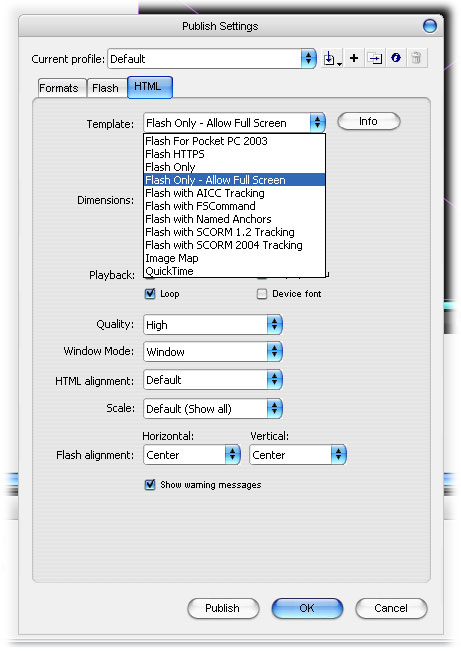
The implementing of the fullscreen support is rather simple in our case because we don’t have too much stuff on the stage we need to reposition/resize once we hit the fullscreen mode. So, first of all, we set the scale mode of the stage to no scale because we want to resize the object individualy and not everything. We also set the stage align mode to the top left corner:
stage.scaleMode	= StageScaleMode.NO_SCALE;
stage.align		= StageAlign.TOP_LEFT;
Then we add two event listeners for the fullscreen button. One to enter it and one for leaving the full screen mode. We also add an event listener when the fullscreen mode changes. The visibility of the btnFullscreenOff button will be set to false. We do all of this in the initVideoPlayer() function:
	mcVideoControls.btnFullscreenOn.addEventListener(MouseEvent.CLICK, fullscreenOnClicked);
	mcVideoControls.btnFullscreenOff.addEventListener(MouseEvent.CLICK, fullscreenOffClicked);
	stage.addEventListener(FullScreenEvent.FULL_SCREEN, onFullscreen);
	mcVideoControls.btnFullscreenOff.visible = false;
To actualy enter and leave the fullscreen mode, all you need to do is to set the display state of the stage to the wanted mode. That’s what we’re doing when the user clicks the fullscreen buttons:
function fullscreenOnClicked(e:MouseEvent):void {
	stage.displayState = StageDisplayState.FULL_SCREEN;
}

function fullscreenOffClicked(e:MouseEvent):void {
	stage.displayState = StageDisplayState.NORMAL;
}
Now we only need to define the resizing action in the onFullScreen() function:
function onFullscreen(e:FullScreenEvent):void {
    if (e.fullScreen) {
        mcVideoControls.btnFullscreenOn.visible = false;
		mcVideoControls.btnFullscreenOff.visible = true;

		mcVideoControls.x = (Capabilities.screenResolutionX - 440) / 2;
		mcVideoControls.y = (Capabilities.screenResolutionY - 33);

		vidDisplay.height = (Capabilities.screenResolutionY - 33);
		vidDisplay.width = vidDisplay.height * 4 / 3;
		vidDisplay.x	= (Capabilities.screenResolutionX - vidDisplay.width) / 2;
    } else {
        mcVideoControls.btnFullscreenOn.visible = true;
		mcVideoControls.btnFullscreenOff.visible = false;
		mcVideoControls.x = 0;
		mcVideoControls.y = 330;
		vidDisplay.y = 0;
		vidDisplay.x = 0;
		vidDisplay.width = 440;
		vidDisplay.height = 330;
    }
}
So, first we check if we’re entering the fullscreen mode. If so, we switch the fullscreen buttons, align the control bar in the bottom center of the screen and size up the video display and center it on to the screen. If we’re leaving the fullscreen mode, what you can also do by pressing the ESC key on your keyboard, we reset all the stuff to how it was before.
That’s was already everything for the fullscreen support 🙂
Save volume
This is quite an important feature and really ease to implement in flash. To save the last used volume you can use the flash cookies which will be stored on the computer of the user. They are like normal browser cookies, but can only accessed through flash. So, the first thing we need to do is creating a new shared object:
var shoVideoPlayerSettings:SharedObject = SharedObject.getLocal("playerSettings");The function getLocal returns the shared object you’ve requested. In our case we want to have the playerSettings cookie/shared object. Since we want to set the volume on the start, we add the following line to the initVideoPlayer() function:
	var tmpVolume:Number = DEFAULT_VOLUME;
	if(shoVideoPlayerSettings.data.playerVolume != undefined) {
		tmpVolume = shoVideoPlayerSettings.data.playerVolume;
		intLastVolume = tmpVolume;
	}

	mcVideoControls.mcVolumeScrubber.x = (53 * tmpVolume) + 318;
	mcVideoControls.mcVolumeFill.mcFillRed.width = mcVideoControls.mcVolumeScrubber.x - 371 + 53;
	setVolume(tmpVolume);
First we assign the DEFAULT_VOLUME to a temporary variable. Then we check if the user has already a cookie with the player volume. If so, we override the value from the variable. Then we update the volume bar and set the volume with the setVolume() function. In order to store the new volume in the cookie, we add the following two new lines to the setVolume() function:
	shoVideoPlayerSettings.data.playerVolume = intVolume;
	shoVideoPlayerSettings.flush();
The function flush() writes the new value immediately in the flash cookie.
Clickable progress/volume bar
This is just a beauty hack for the player. We want to be able to click on the progress or the volume bar to begin with the scrubbing. So, we just added two invisible buttons on the off the bars and added the function to it as when you click the scrub buttons directly:
	mcVideoControls.mcVolumeScrubber.btnVolumeScrubber.addEventListener(MouseEvent.MOUSE_DOWN, volumeScrubberClicked);
	mcVideoControls.mcProgressScrubber.btnProgressScrubber.addEventListener(MouseEvent.MOUSE_DOWN, progressScrubberClicked);
And what’s also changed is, that we now lock the center in the startDrag() function. Like this the scrubber will move to where you clicked on the bars:
function volumeScrubberClicked(e:MouseEvent):void {
	bolVolumeScrub = true;

	mcVideoControls.mcVolumeScrubber.startDrag(true, new Rectangle(318, 19, 53, 0));
}

function progressScrubberClicked(e:MouseEvent):void {
	bolProgressScrub = true;

	mcVideoControls.mcProgressScrubber.startDrag(true, new Rectangle(0, 2, 432, 0));
}
We’ve already reached the end of the second part of the video player tutorial. We hope that you enjoyed reading it and we appreciate every kind of feedback.
Full code with comments
// ###############################
// ############# CONSTANTS
// ###############################

// time to buffer for the video in sec.
const BUFFER_TIME:Number				= 8;
// start volume when initializing player
const DEFAULT_VOLUME:Number				= 0.6;
// update delay in milliseconds.
const DISPLAY_TIMER_UPDATE_DELAY:int	= 10;
// smoothing for video. may slow down old computers
const SMOOTHING:Boolean					= true;

// ###############################
// ############# VARIABLES
// ###############################

// flag for knowing if user hovers over description label
var bolDescriptionHover:Boolean = false;
// flag for knowing in which direction the description label is currently moving
var bolDescriptionHoverForward:Boolean = true;
// flag for knowing if flv has been loaded
var bolLoaded:Boolean					= false;
// flag for volume scrubbing
var bolVolumeScrub:Boolean				= false;
// flag for progress scrubbing
var bolProgressScrub:Boolean			= false;
// holds the number of the active video
var intActiveVid:int;
// holds the last used volume, but never 0
var intLastVolume:Number				= DEFAULT_VOLUME;
// net connection object for net stream
var ncConnection:NetConnection;
// net stream object
var nsStream:NetStream;
// object holds all meta data
var objInfo:Object;
// shared object holding the player settings (currently only the volume)
var shoVideoPlayerSettings:SharedObject = SharedObject.getLocal("playerSettings");
// url to flv file
var strSource:String					= root.loaderInfo.parameters.playlist == null ? "playlist.xml" : root.loaderInfo.parameters.playlist;
// timer for updating player (progress, volume...)
var tmrDisplay:Timer;
// loads the xml file
var urlLoader:URLLoader;
// holds the request for the loader
var urlRequest:URLRequest;
// playlist xml
var xmlPlaylist:XML;

// ###############################
// ############# STAGE SETTINGS
// ###############################
stage.scaleMode	= StageScaleMode.NO_SCALE;
stage.align		= StageAlign.TOP_LEFT;

// ###############################
// ############# FUNCTIONS
// ###############################

// sets up the player
function initVideoPlayer():void {
	// hide video controls on initialisation
	mcVideoControls.visible = false;

	// hide buttons
	mcVideoControls.btnUnmute.visible			= false;
	mcVideoControls.btnPause.visible			= false;
	mcVideoControls.btnFullscreenOff.visible	= false;

	// set the progress/preload fill width to 1
	mcVideoControls.mcProgressFill.mcFillRed.width	= 1;
	mcVideoControls.mcProgressFill.mcFillGrey.width	= 1;

	// set time and duration label
	mcVideoControls.lblTimeDuration.htmlText		= "00:00 / 00:00";

	// add global event listener when mouse is released
	stage.addEventListener(MouseEvent.MOUSE_UP, mouseReleased);

	// add fullscreen listener
	stage.addEventListener(FullScreenEvent.FULL_SCREEN, onFullscreen);

	// add event listeners to all buttons
	mcVideoControls.btnPause.addEventListener(MouseEvent.CLICK, pauseClicked);
	mcVideoControls.btnPlay.addEventListener(MouseEvent.CLICK, playClicked);
	mcVideoControls.btnStop.addEventListener(MouseEvent.CLICK, stopClicked);
	mcVideoControls.btnNext.addEventListener(MouseEvent.CLICK, playNext);
	mcVideoControls.btnPrevious.addEventListener(MouseEvent.CLICK, playPrevious);
	mcVideoControls.btnMute.addEventListener(MouseEvent.CLICK, muteClicked);
	mcVideoControls.btnUnmute.addEventListener(MouseEvent.CLICK, unmuteClicked);
	mcVideoControls.btnFullscreenOn.addEventListener(MouseEvent.CLICK, fullscreenOnClicked);
	mcVideoControls.btnFullscreenOff.addEventListener(MouseEvent.CLICK, fullscreenOffClicked);

	mcVideoControls.btnVolumeBar.addEventListener(MouseEvent.MOUSE_DOWN, volumeScrubberClicked);
	mcVideoControls.mcVolumeScrubber.btnVolumeScrubber.addEventListener(MouseEvent.MOUSE_DOWN, volumeScrubberClicked);
	mcVideoControls.btnProgressBar.addEventListener(MouseEvent.MOUSE_DOWN, progressScrubberClicked);
	mcVideoControls.mcProgressScrubber.btnProgressScrubber.addEventListener(MouseEvent.MOUSE_DOWN, progressScrubberClicked);

	mcVideoControls.mcVideoDescription.btnDescription.addEventListener(MouseEvent.MOUSE_OVER, startDescriptionScroll);
	mcVideoControls.mcVideoDescription.btnDescription.addEventListener(MouseEvent.MOUSE_OUT, stopDescriptionScroll);

	// create timer for updating all visual parts of player and add
	// event listener
	tmrDisplay = new Timer(DISPLAY_TIMER_UPDATE_DELAY);
	tmrDisplay.addEventListener(TimerEvent.TIMER, updateDisplay);

	// create a new net connection, add event listener and connect
	// to null because we don't have a media server
	ncConnection = new NetConnection();
	ncConnection.addEventListener(NetStatusEvent.NET_STATUS, netStatusHandler);
	ncConnection.connect(null);

	// create a new netstream with the net connection, add event
	// listener, set client to this for handling meta data and
	// set the buffer time to the value from the constant
	nsStream = new NetStream(ncConnection);
	nsStream.addEventListener(NetStatusEvent.NET_STATUS, netStatusHandler);
	nsStream.client = this;
	nsStream.bufferTime = BUFFER_TIME;

	// attach net stream to video object on the stage
	vidDisplay.attachNetStream(nsStream);
	// set the smoothing value from the constant
	vidDisplay.smoothing = SMOOTHING;

	// set default volume and get volume from shared object if available
	var tmpVolume:Number = DEFAULT_VOLUME;
	if(shoVideoPlayerSettings.data.playerVolume != undefined) {
		tmpVolume = shoVideoPlayerSettings.data.playerVolume;
		intLastVolume = tmpVolume;
	}
	// update volume bar and set volume
	mcVideoControls.mcVolumeScrubber.x = (53 * tmpVolume) + 318;
	mcVideoControls.mcVolumeFill.mcFillRed.width = mcVideoControls.mcVolumeScrubber.x - 371 + 53;
	setVolume(tmpVolume);

	// create new request for loading the playlist xml, add an event listener
	// and load it
	urlRequest = new URLRequest(strSource);
	urlLoader = new URLLoader();
	urlLoader.addEventListener(Event.COMPLETE, playlistLoaded);
	urlLoader.load(urlRequest);
}
function playClicked(e:MouseEvent):void {
	// check's, if the flv has already begun
	// to download. if so, resume playback, else
	// load the file
	if(!bolLoaded) {
		nsStream.play(strSource);
		bolLoaded = true;
	}
	else{
		nsStream.resume();
	}

	vidDisplay.visible = true;

	// switch play/pause visibility
	mcVideoControls.btnPause.visible	= true;
	mcVideoControls.btnPlay.visible		= false;
}

function pauseClicked(e:MouseEvent):void {
	// pause video
	nsStream.pause();

	// switch play/pause visibility
	mcVideoControls.btnPause.visible	= false;
	mcVideoControls.btnPlay.visible		= true;
}

function stopClicked(e:MouseEvent):void {
	// calls stop function
	stopVideoPlayer();
}

function muteClicked(e:MouseEvent):void {
	// set volume to 0
	setVolume(0);

	// update scrubber and fill position/width
	mcVideoControls.mcVolumeScrubber.x				= 318;
	mcVideoControls.mcVolumeFill.mcFillRed.width	= 1;
}

function unmuteClicked(e:MouseEvent):void {
	// set volume to last used value or DEFAULT_VOLUME if last volume is zero
	var tmpVolume:Number = intLastVolume == 0 ? DEFAULT_VOLUME : intLastVolume
	setVolume(tmpVolume);

	// update scrubber and fill position/width
	mcVideoControls.mcVolumeScrubber.x = (53 * tmpVolume) + 318;
	mcVideoControls.mcVolumeFill.mcFillRed.width = mcVideoControls.mcVolumeScrubber.x - 371 + 53;
}

function volumeScrubberClicked(e:MouseEvent):void {
	// set volume scrub flag to true
	bolVolumeScrub = true;

	// start drag
	mcVideoControls.mcVolumeScrubber.startDrag(true, new Rectangle(318, 19, 53, 0)); // NOW TRUE
}

function progressScrubberClicked(e:MouseEvent):void {
	// set progress scrub flag to true
	bolProgressScrub = true;

	// start drag
	mcVideoControls.mcProgressScrubber.startDrag(true, new Rectangle(0, 2, 432, 0)); // NOW TRUE
}

function mouseReleased(e:MouseEvent):void {
	// set progress/volume scrub to false
	bolVolumeScrub		= false;
	bolProgressScrub	= false;

	// stop all dragging actions
	mcVideoControls.mcProgressScrubber.stopDrag();
	mcVideoControls.mcVolumeScrubber.stopDrag();

	// update progress/volume fill
	mcVideoControls.mcProgressFill.mcFillRed.width	= mcVideoControls.mcProgressScrubber.x + 5;
	mcVideoControls.mcVolumeFill.mcFillRed.width	= mcVideoControls.mcVolumeScrubber.x - 371 + 53;

	// save the volume if it's greater than zero
	if((mcVideoControls.mcVolumeScrubber.x - 318) / 53 > 0)
		intLastVolume = (mcVideoControls.mcVolumeScrubber.x - 318) / 53;
}

function updateDisplay(e:TimerEvent):void {
	// checks, if user is scrubbing. if so, seek in the video
	// if not, just update the position of the scrubber according
	// to the current time
	if(bolProgressScrub)
		nsStream.seek(Math.round(mcVideoControls.mcProgressScrubber.x * objInfo.duration / 432))
	else
		mcVideoControls.mcProgressScrubber.x = nsStream.time * 432 / objInfo.duration;

	// set time and duration label
	mcVideoControls.lblTimeDuration.htmlText		= "" + formatTime(nsStream.time) + " / " + formatTime(objInfo.duration);

	// update the width from the progress bar. the grey one displays
	// the loading progress
	mcVideoControls.mcProgressFill.mcFillRed.width	= mcVideoControls.mcProgressScrubber.x + 5;
	mcVideoControls.mcProgressFill.mcFillGrey.width	= nsStream.bytesLoaded * 438 / nsStream.bytesTotal;

	// update volume and the red fill width when user is scrubbing
	if(bolVolumeScrub) {
		setVolume((mcVideoControls.mcVolumeScrubber.x - 318) / 53);
		mcVideoControls.mcVolumeFill.mcFillRed.width = mcVideoControls.mcVolumeScrubber.x - 371 + 53;
	}

	// chech if user is currently hovering over description label
	if(bolDescriptionHover) {
		// check in which direction we're currently moving
		if(bolDescriptionHoverForward) {
			// move to the left and check if we've shown everthing
			mcVideoControls.mcVideoDescription.lblDescription.x -= 0.1;
			if(mcVideoControls.mcVideoDescription.lblDescription.textWidth - 133 <= Math.abs(mcVideoControls.mcVideoDescription.lblDescription.x))
				bolDescriptionHoverForward = false;
		} else {
			// move to the right and check if we're back to normal
			mcVideoControls.mcVideoDescription.lblDescription.x += 0.1;
			if(mcVideoControls.mcVideoDescription.lblDescription.x >= 0)
				bolDescriptionHoverForward = true;
		}
	} else {
		// reset label position and direction variable
		mcVideoControls.mcVideoDescription.lblDescription.x = 0;
		bolDescriptionHoverForward = true;
	}
}

function onMetaData(info:Object):void {
	// stores meta data in a object
	objInfo = info;

	// now we can start the timer because
	// we have all the neccesary data
	if(!tmrDisplay.running)
		tmrDisplay.start();
}

function netStatusHandler(event:NetStatusEvent):void {
	// handles net status events
	switch (event.info.code) {
		// trace a messeage when the stream is not found
		case "NetStream.Play.StreamNotFound":
			trace("Stream not found: " + strSource);
		break;
		// when the video reaches its end, we check if there are
		// more video left or stop the player
		case "NetStream.Play.Stop":
			if(intActiveVid + 1 < xmlPlaylist..vid.length())
				playNext();
			else
				stopVideoPlayer();
		break;
	}
}

function stopVideoPlayer():void {
	// pause netstream, set time position to zero
	nsStream.pause();
	nsStream.seek(0);

	// in order to clear the display, we need to
	// set the visibility to false since the clear
	// function has a bug
	vidDisplay.visible					= false;

	// switch play/pause button visibility
	mcVideoControls.btnPause.visible	= false;
	mcVideoControls.btnPlay.visible		= true;
}

function setVolume(intVolume:Number = 0):void {
	// create soundtransform object with the volume from
	// the parameter
	var sndTransform		= new SoundTransform(intVolume);
	// assign object to netstream sound transform object
	nsStream.soundTransform	= sndTransform;

	// hides/shows mute and unmute button according to the
	// volume
	if(intVolume > 0) {
		mcVideoControls.btnMute.visible		= true;
		mcVideoControls.btnUnmute.visible	= false;
	} else {
		mcVideoControls.btnMute.visible		= false;
		mcVideoControls.btnUnmute.visible	= true;
	}

	// store the volume in the flash cookie
	shoVideoPlayerSettings.data.playerVolume = intVolume;
	shoVideoPlayerSettings.flush();
}

function formatTime(t:int):String {
	// returns the minutes and seconds with leading zeros
	// for example: 70 returns 01:10
	var s:int = Math.round(t);
	var m:int = 0;
	if (s > 0) {
		while (s > 59) {
			m++; s -= 60;
		}
		return String((m < 10 ? "0" : "") + m + ":" + (s < 10 ? "0" : "") + s);
	} else {
		return "00:00";
	}
}

function fullscreenOnClicked(e:MouseEvent):void {
	// go to fullscreen mode
	stage.displayState = StageDisplayState.FULL_SCREEN;
}

function fullscreenOffClicked(e:MouseEvent):void {
	// go to back to normal mode
	stage.displayState = StageDisplayState.NORMAL;
}

function onFullscreen(e:FullScreenEvent):void {
	// check if we're entering or leaving fullscreen mode
    if (e.fullScreen) {
		// switch fullscreen buttons
        mcVideoControls.btnFullscreenOn.visible = false;
		mcVideoControls.btnFullscreenOff.visible = true;

		// bottom center align controls
		mcVideoControls.x = (Capabilities.screenResolutionX - 440) / 2;
		mcVideoControls.y = (Capabilities.screenResolutionY - 33);

		// size up video display
		vidDisplay.height 	= (Capabilities.screenResolutionY - 33);
		vidDisplay.width 	= vidDisplay.height * 4 / 3;
		vidDisplay.x		= (Capabilities.screenResolutionX - vidDisplay.width) / 2;
    } else {
		// switch fullscreen buttons
        mcVideoControls.btnFullscreenOn.visible = true;
		mcVideoControls.btnFullscreenOff.visible = false;

		// reset controls position
		mcVideoControls.x = 0;
		mcVideoControls.y = 330;

		// reset video display
		vidDisplay.y = 0;
		vidDisplay.x = 0;
		vidDisplay.width = 440;
		vidDisplay.height = 330;
    }
}

function playlistLoaded(e:Event):void {
	// create new xml with loaded data from loader
	xmlPlaylist = new XML(urlLoader.data);

	// set source of the first video but don't play it
	playVid(0, false)

	// show controls
	mcVideoControls.visible = true;
}

function playVid(intVid:int = 0, bolPlay = true):void {
	if(bolPlay) {
		// stop timer
		tmrDisplay.stop();

		// play requested video
		nsStream.play(String(xmlPlaylist..vid[intVid].@src));

		// switch button visibility
		mcVideoControls.btnPause.visible	= true;
		mcVideoControls.btnPlay.visible		= false;
	} else {
		strSource = xmlPlaylist..vid[intVid].@src;
	}

	// show video display
	vidDisplay.visible					= true;

	// reset description label position and assign new description
	mcVideoControls.mcVideoDescription.lblDescription.x = 0;
	mcVideoControls.mcVideoDescription.lblDescription.htmlText = (intVid + 1) + ". " + String(xmlPlaylist..vid[intVid].@desc) + "";

	// update active video number
	intActiveVid = intVid;
}

function playNext(e:MouseEvent = null):void {
	// check if there are video left to play and play them
	if(intActiveVid + 1 < xmlPlaylist..vid.length())
		playVid(intActiveVid + 1);

}

function playPrevious(e:MouseEvent = null):void {
	// check if we're not and the beginning of the playlist and go back
	if(intActiveVid - 1 >= 0)
		playVid(intActiveVid - 1);
}

function startDescriptionScroll(e:MouseEvent):void {
	// check if description label is too long and we need to enable scrolling
	if(mcVideoControls.mcVideoDescription.lblDescription.textWidth > 138)
		bolDescriptionHover = true;
}

function stopDescriptionScroll(e:MouseEvent):void {
	// disable scrolling
	bolDescriptionHover = false;
}

// ###############################
// ############# INIT PLAYER
// ###############################
initVideoPlayer();Related posts

Effects / by - 14 January, 2012 5:55 pm
Learn Digital Painting in Photoshop
It’s impossible for everyone to become an artist, but many of them have a will to become an artist, to draw beautiful paintings but again due to lack of command…

Effects / by - 28 December, 2011 2:28 pm
How to Make a New Year Greeting Card in Photoshop
This is so much easy to go in a market and by paying some bucks; purchasing a New Year Greeting Card or any other festival card for your loving person…

Flash / by - 10 August, 2011 4:13 pm
Creating a Gallery in Flash Using the Moto CMS Component
In this tutorial we will create a gallery with the help of the Moto CMS Component. I think many of you have heard about (or even worked with) Moto Flash…
3D / by - 24 July, 2011 5:21 pm
Visualize Your Web Page in 3D
Ever wondered if you could visualize your website in 3D? Well, here’s one such Firefox extension that allows you to do so. Tilt is a Firefox add-on that lets you visualize any web page DOM and provides the relationship between various parts of a website in 3D.
Interfaces / by - 1 March, 2011 2:18 pm
Beginners Guide To User Interface Design in C#
User Interface Design in C# Windows Form Application From Scratch In this C Sharp tutorial you will learn user interface design in C# application. This step-by-step tutorial will help you deeply understand…

Effects / by - 1 December, 2010 2:34 pm
Create an intelligent XML image Gallery & Slideshow in Flash CS4 (+PHP) – Part II/II
In this second part article you will learn how to build an image gallery that will load images from a web server. I decide to call it “Intelligent” because you don’t need to configure any XML or flash file. Just put the Flash movie and the images on a server and they will be loaded automatically. Nice ah?
Flex / by - 29 May, 2010 2:56 pm
Connecting Flex Calendar With Database Using AMF-PHP
Connecting Flex Calendar with Database using AMF-PHP Part I: Create a Dynamic Event Calendar in Flex Builder 3 with Actionscript 3.0 This is Part II of Create a Dynamic Event…
Server Side / by - 13 April, 2010 2:39 pm
CodeIgniter Tutorial – CodeIgniter Explained
Hello everyone, and welcome to the first CodeIgniter tutorial. What will you learn? 1. What is a PHP Framework? 2. What is CodeIgniter? 3. What is MVC? 4. MVC Pattern…
3D / by - 20 March, 2010 10:00 am
Away3D Shoot’em’Up Tutorial – Powerups
In this article we add some powerups to the game.

3D / by - 15 February, 2010 3:59 pm
Away3D Shoot’em’Up Tutorial – Sound Effects
In this article we add some sound effects to the game.
3D / by - 28 July, 2009 1:00 pm
Create from Scratch a Away3D Shoot’em’Up Game: Part 4
Now that we have the player and some enemies we need for them to be able to interact. This is done through collision detection which you will learn in this fourth part.
Effects / by - 21 July, 2009 1:00 pm
Getting Started With BetweenAS3
There are many popular open source tweening engines in the Flash community today. Numbered among these are Tweener, TweenLite/Tweenmax, Tweensy, and GTween. This is a short look at the capabilities of newcomer to the scene: BetweenAS3. BetweenAS3 is the tweening engine brainchild of Yoshihiro (yossy) Shindo and is available as part of the Spark project (i.e. it is brought to us by one of the same group that brought the world the FLARToolkit for Augmented Reality in Flash and countless other goodies).
3D / by - 15 July, 2009 12:50 pm
Create from Scratch a Away3D Shoot’em’Up Game: Part 3
After you have created the 3D level, in the part 3 of this Away3D series, we will show you how to add the player spacecraft and enemies.
Effects / by - 13 July, 2009 12:30 pm
Create an intelligent XML image Gallery & Slideshow in Flash CS4 (+PHP) – Part I/II
In this article you will learn how to build an image gallery that will load images from a web server. I decide to call it “Intelligent” because you don’t need to configure any XML or flash file. Just put the Flash movie and the images on a server and they will be loaded automatically. Nice ah?
3D / by - 8 July, 2009 1:45 pm
Create from Scratch a Away3D Shoot’em’Up Game: Part 2
In the part 1 of these tutorial series articles we created a framework that we could build off to start making the actual game. Now it’s time to create a 3D level for the player to fly through.
3D / by - 6 July, 2009 12:50 pm
Create from Scratch a Away3D Shoot’em’Up Game: Part 1
Today we start a 9 part tutorial series on creating a Shoot’em’Up game. We will cover all the necessary topics to create it from scratch, which will help you to understand and apply these guidelines to other projects. Ath this first part. we look at getting the Away3D engine up and running by creating a UIComponent that will contain and initialize the necessary Away3D components.
Effects / by - 1 July, 2009 1:00 pm
Build a Creative “Swirl Animated Menu” with Flash CS4
Flash it’s a powerful application and can be really complex, but even beginners can create a cool menu for demonstration or for use in a personal site. The menu that we will create is simple, but the swirl animation is something that you don’t see everywhere, for that I’ve decided to explain one way to make an animation of growing swirls without any Action Script code.You will also learn how to import artwork from illustrator where I’ve pre-made the graphics, the work is very simple and the result will be very cool.
Flash / by - 29 June, 2009 12:00 pm
SWFObject and Best Practice Implementation
With more and more full screen Flash web sites appearing on the internet, it’s important to understand how to properly embed the Flash movie in the browser window.
In this tutorial we will cover best practice embedding of SWF movies using SWFObject with a custom function for adding browser scrollbars for smaller browser windows.
3D / by - 24 June, 2009 12:30 pm
Create a 3D Bowling Game with JiglibFlash and Papervision 3D
Possibly the hottest thing to hit the Flash community since the advent of several excellent 3D engines is the recent debut of 3D physics engines. Here we’ll examine a way of using one of the more popular 3D engines, JiglibFlash, in conjunction with the prominent 3D engine Papervision3D to create a bowling game.
Flex / by - 22 June, 2009 1:00 pm
Create a Dynamic Event Calendar in Flex Builder 3 with Actionscript 3.0
This tutorial will allow readers to create an Event Calendar application using Flex. The final user will be able to plan over a daily, weekly or monthly plan.
You will learn on this step by step Flex tutorial, to create from scratch those Graphic User Interfaces, integrate them, and create a complete Rich Internet Application with a professional look.